Complete Guide to Renting GPUs with Cryptocurrency
Last Updated: February 11, 2026 | Reading Time: 16 minutes
Renting GPU computing power with cryptocurrency combines two technologies that value decentralization and reduced intermediaries. This guide walks through the entire process—from selecting a crypto-friendly provider to completing your first rental using blockchain-based payments.
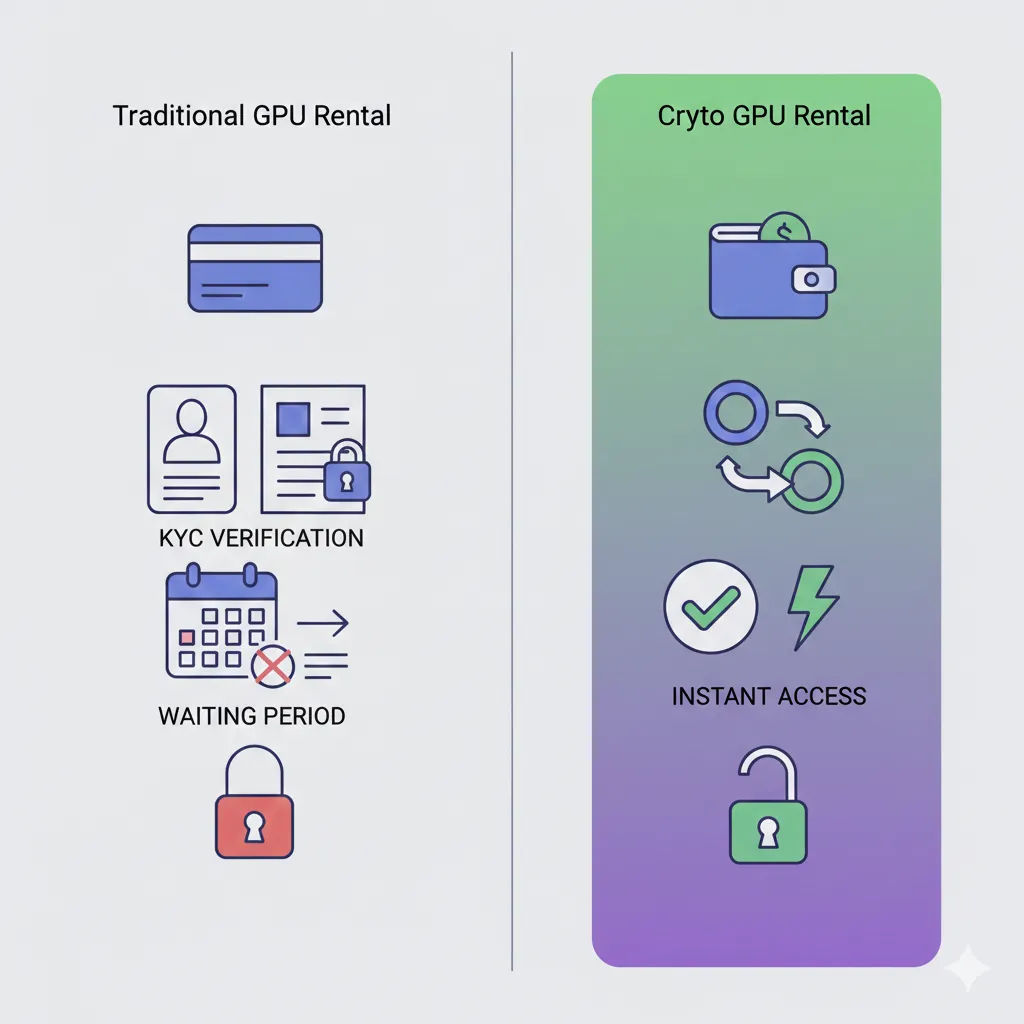
Traditional GPU rental through AWS, Azure, or Google Cloud requires credit cards, corporate accounts, and identity verification. The cryptocurrency alternative eliminates these barriers while often reducing costs through peer-to-peer marketplaces and lower platform fees.
Why Rent GPUs with Cryptocurrency?
The intersection of cryptocurrency payments and GPU rental serves several practical purposes beyond ideological preference for decentralization.
Privacy and reduced verification requirements. Many crypto-native GPU platforms operate without mandatory KYC (Know Your Customer) verification. You can rent computing resources using only a wallet address and cryptocurrency balance. This appeals to privacy-conscious users, individuals in regions with limited banking infrastructure, and developers who prefer pseudonymous transactions. Cryptocurrency payments enable workflows that are impossible with traditional banking. For instance, you can train LLM models on sensitive datasets without linking your identity to the compute provider.
Lower platform fees translate to better pricing. Traditional payment processing through credit cards and payment gateways costs 2.5-3.5% plus fixed fees. Cryptocurrency transactions eliminate merchant processing fees entirely—you pay only blockchain network fees, typically $0.10-2.00 per transaction regardless of amount. Platforms can pass these savings to users through reduced platform fees.
Smart contract escrow eliminates counterparty risk. Traditional GPU marketplaces hold funds centrally, requiring trust in platform operators. Blockchain-based escrow locks payment in smart contracts that automatically release funds upon rental completion. Neither party can unilaterally access escrowed funds, removing the need to trust a central authority.
International accessibility without currency conversion. Cryptocurrency operates identically across borders. A developer in Nigeria accesses the same pricing and payment process as someone in Singapore or Brazil. No currency exchange fees, no regional payment method restrictions, no delayed international transfers.
Immediate access and settlement. Cryptocurrency payments confirm within minutes rather than the 2-5 business day ACH or wire transfer timelines. Smart contract escrow enables instant GPU access once blockchain confirmation completes.
Cryptocurrency-Friendly GPU Providers
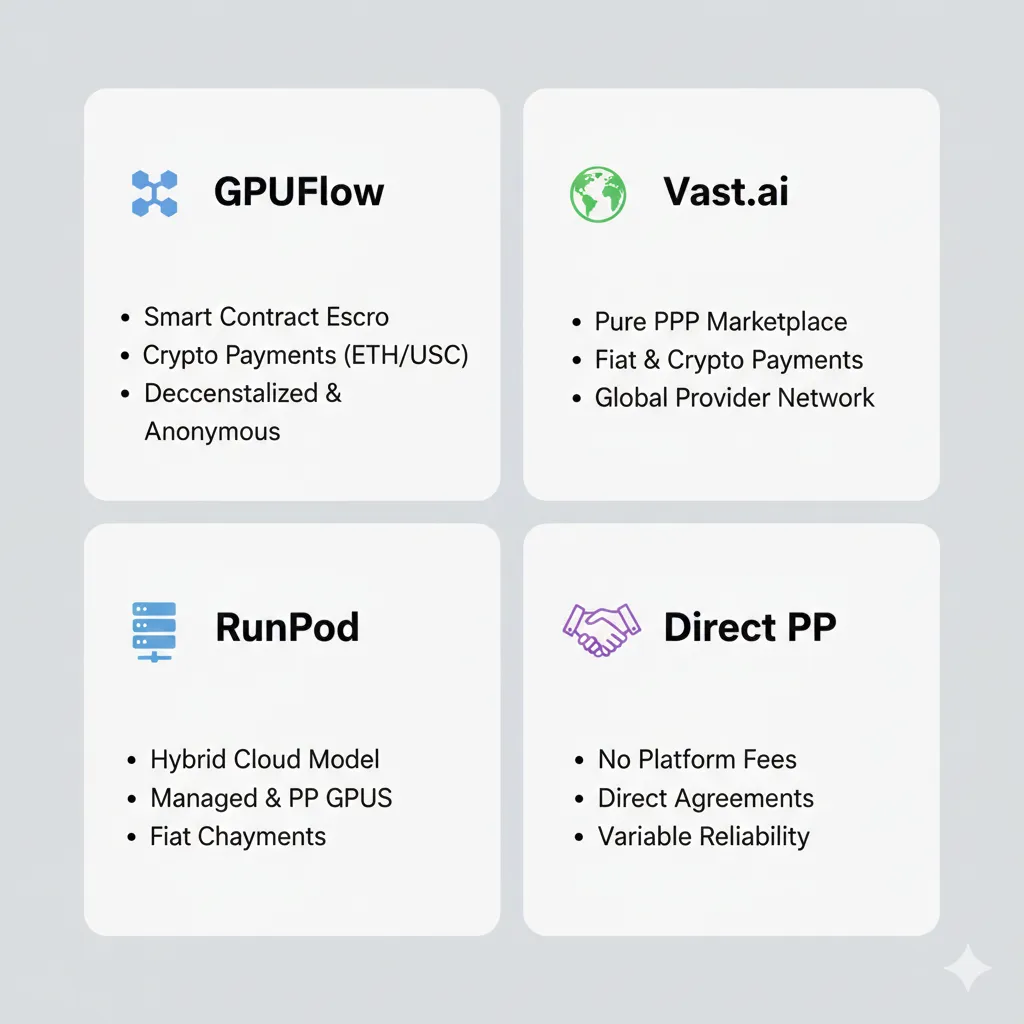
The GPU rental market includes several platforms with native cryptocurrency support. Each takes a different approach to crypto integration and serves distinct user priorities.
GPUFlow
GPUFlow built its marketplace specifically around cryptocurrency payments and blockchain-verified transactions. The platform operates entirely on smart contract escrow using Polygon network for low-fee transactions.
Payment methods: Ethereum (ETH), Polygon (MATIC), Solana (SOL), USDC, USDT
KYC requirement: None
Escrow mechanism: Polygon smart contracts with automated release
Platform fee: 10-15%
Typical GPU pricing: RTX 4090 at $0.50-0.80/hr, A100 at $1.20-1.80/hr. For a detailed comparison across all providers, see our GPU Rental Pricing Comparison 2026.
GPUFlow prioritizes immediate access. The platform targets users who value privacy, want to avoid identity verification, or prefer blockchain-native workflows. Setup takes approximately 30 seconds—connect wallet, deposit cryptocurrency, select GPU, and access via web terminal.
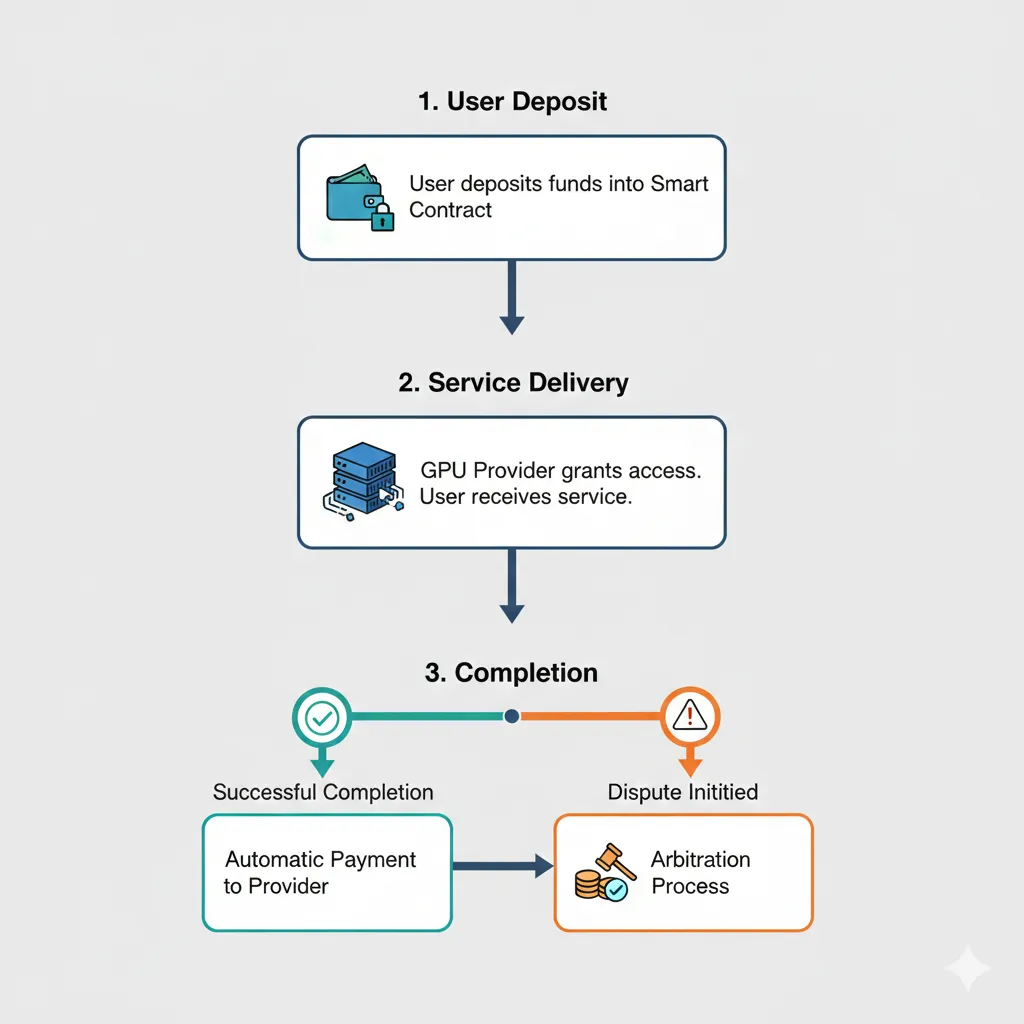
The smart contract escrow system locks your payment when rental begins. Upon successful completion, funds automatically release to the GPU provider. If service fails to meet specifications, dispute resolution occurs through contract parameters rather than support tickets.
Best for: Privacy-conscious users, crypto-native developers, anyone avoiding KYC requirements, users prioritizing low platform fees.
Vast.ai
Vast.ai operates primarily with traditional payment methods but accepts cryptocurrency through third-party payment processors. The integration is less seamless than GPUFlow but provides crypto access to a larger provider network.
Payment methods: Bitcoin (BTC), Ethereum (ETH), and 15+ altcoins through CoinPayments
KYC requirement: None for basic rental, may be required for provider payouts
Escrow mechanism: Platform-held, not blockchain-based
Platform fee: ~20%
Typical GPU pricing: RTX 4090 at $0.29-0.78/hr, A100 at $0.84-1.49/hr
Vast.ai offers the largest selection of available GPUs across its peer-to-peer marketplace. Cryptocurrency payment integration serves as an alternative to credit cards rather than a primary design feature. Funds are held by the platform rather than smart contracts.
Best for: Users prioritizing GPU selection and lowest absolute pricing, those comfortable with platform-held escrow.
RunPod
RunPod added cryptocurrency payment options in 2025 through integration with payment gateway providers. The platform primarily serves users paying with traditional methods but accommodates crypto users.
Payment methods: Bitcoin (BTC), Ethereum (ETH), USDC via Coinbase Commerce
KYC requirement: Optional—required only for certain account limits
Escrow mechanism: Platform-held credit system
Platform fee: ~20%
Typical GPU pricing: RTX 4090 at $0.59/hr, A100 at $1.39-1.49/hr
RunPod converts cryptocurrency payments to platform credits that function like prepaid balances. The process involves an extra conversion step but provides access to RunPod’s managed infrastructure and pre-configured templates.
Best for: Users wanting RunPod’s reliability and templates while paying with cryptocurrency.
Individual Providers on Marketplaces
Some GPU providers on marketplaces like Massed Compute or individual Discord communities accept direct cryptocurrency payments outside platform infrastructure. This approach offers maximum flexibility but requires more trust evaluation.
Payment methods: Varies by provider—typically BTC, ETH, stablecoins
KYC requirement: Provider-dependent
Escrow mechanism: None, or third-party escrow services
Platform fee: 0% (direct negotiation)
Pricing: Negotiated individually
Direct cryptocurrency arrangements eliminate platform fees entirely but require vetting providers independently. Reputation systems, community feedback, and escrow services like Particl or OpenBazaar can mitigate risk.
Best for: Experienced users comfortable evaluating counterparty risk, those seeking absolute lowest pricing through direct negotiation.
Accepted Cryptocurrencies and Payment Networks
GPU rental platforms accept different cryptocurrencies based on transaction costs, settlement speed, and user demand. Understanding network characteristics helps optimize payment costs.
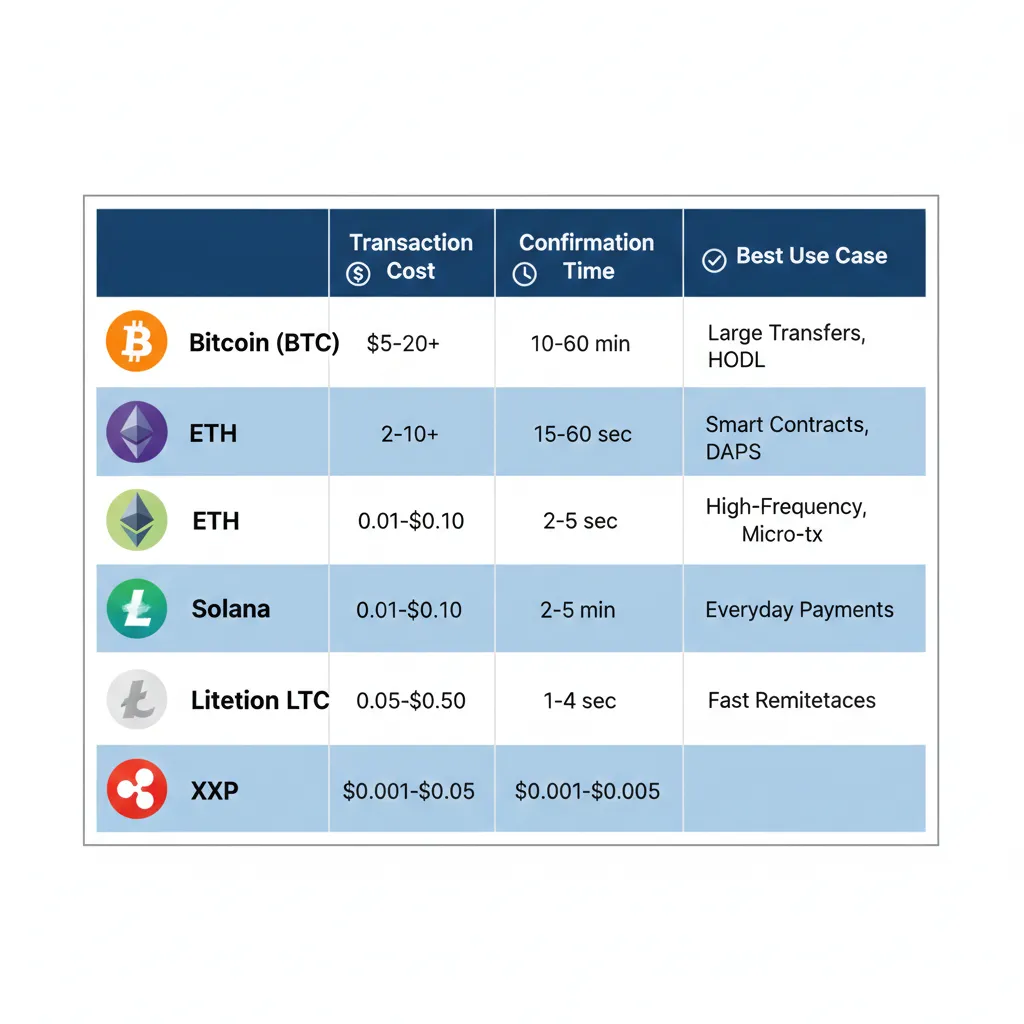
Ethereum (ETH)
Ethereum remains the most widely accepted cryptocurrency for GPU rentals despite higher transaction fees. Layer-2 scaling solutions have reduced costs significantly since 2024.
Transaction cost: $0.50-3.00 on Ethereum mainnet, $0.01-0.10 on Polygon/Arbitrum
Confirmation time: 15-60 seconds on mainnet, 2-5 seconds on L2
Acceptance: Universal among crypto-friendly platforms
Ethereum’s dominance in DeFi and smart contracts makes it the natural choice for escrow-based rental systems. Platforms like GPUFlow deploy contracts on Polygon (an Ethereum sidechain) to minimize gas fees while maintaining Ethereum compatibility.
Bitcoin (BTC)
Bitcoin acceptance serves users holding BTC who prefer not to convert to other cryptocurrencies. Transaction fees and confirmation times make it less practical for frequent small rentals.
Transaction cost: $1-10 depending on network congestion
Confirmation time: 10-60 minutes for secure confirmation
Acceptance: Available through payment processors on most platforms
Bitcoin works well for large prepaid credit deposits or extended rental periods where transaction fees become negligible relative to rental costs. For hourly rentals under $20, alternative cryptocurrencies offer better economics.
Stablecoins (USDC, USDT, DAI)
Stablecoins pegged to the US dollar eliminate cryptocurrency price volatility during the rental period. Most crypto-accepting GPU platforms prefer stablecoin payments for this predictability.
Transaction cost: $0.01-0.50 depending on network (Polygon, Solana, or Ethereum)
Confirmation time: 2-30 seconds depending on network
Acceptance: Growing rapidly, now supported by most crypto platforms
A developer depositing $100 USDC knows exactly how many GPU hours that provides regardless of cryptocurrency market movements. Providers similarly avoid volatility risk when receiving stablecoin payments.
Solana (SOL)
Solana’s low fees and fast confirmation make it increasingly popular for GPU rental payments, particularly on platforms like GPUFlow that prioritize user experience.
Transaction cost: $0.0001-0.001 (effectively free)
Confirmation time: 400-800 milliseconds
Acceptance: GPUFlow and select platforms
Solana’s near-instant settlement and negligible fees make it ideal for short-term GPU rentals where frequent start/stop cycles would accumulate transaction costs on other networks.
Polygon (MATIC)
Polygon serves as the primary network for many GPU rental smart contracts, balancing low fees with Ethereum ecosystem compatibility.
Transaction cost: $0.001-0.05
Confirmation time: 2-5 seconds
Acceptance: GPUFlow primary network, available on other platforms
Polygon’s position as an Ethereum sidechain allows developers familiar with Ethereum tools to interact with rental contracts without learning new systems while enjoying dramatically reduced transaction costs.
How Smart Contract Escrow Works
Traditional escrow requires trusting a third party to hold funds and mediate disputes. Smart contract escrow eliminates this intermediary through code that automatically enforces agreements.
The Traditional Escrow Problem
When you rent a GPU through conventional platforms, you deposit funds with the platform operator. The platform promises to:
- Hold funds securely during the rental
- Pay providers only after successful service delivery
- Refund you if service fails
- Mediate disputes fairly
This model requires trusting platform operators with custody of funds. Platform bankruptcy, security breaches, or policy changes can jeopardize your deposits. Dispute resolution depends on platform support responsiveness and fairness.
Smart Contract Alternative
Blockchain-based escrow replaces platform custody with executable code deployed on a public blockchain. The smart contract holds funds in a cryptographic address that neither party controls unilaterally.
When you initiate a GPU rental:
- You approve the smart contract to transfer a specific amount from your wallet
- The contract locks these funds in escrow, viewable on-chain but inaccessible to either party
- The contract records rental parameters: duration, GPU specifications, start time
- Provider sees confirmed escrow and grants GPU access
When rental completes successfully:
- Rental duration expires or you manually end the session
- Contract calculates total cost based on actual usage time
- Contract automatically transfers payment to provider’s wallet
- Any unused escrow returns to your wallet
- Both transfers execute atomically—either both succeed or neither does
If service fails to meet specifications:
- You or the provider can initiate a dispute within the contract
- Contract examines objective criteria: rental duration, connection logs, uptime metrics
- Predefined rules determine fund distribution based on evidence
- For subjective disputes, contracts may involve DAO governance or arbitration oracles
Advantages Over Platform-Held Escrow
Transparency: All escrow addresses and contract code are publicly visible on blockchain explorers. You can verify your funds are locked in the contract rather than trusting platform balance displays.
Censorship resistance: Smart contracts execute based on code logic, not platform policy decisions. Platforms cannot freeze funds, change payment terms retroactively, or deny withdrawals.
Automated execution: Payment release happens automatically when conditions are met. No waiting for platform processing, no support tickets required for routine transactions.
Reduced counterparty risk: Neither platform operators, GPU providers, nor renters can unilaterally access escrowed funds. Code enforcement replaces trust in human actors.
Limitations and Considerations
Smart contract escrow is not perfect. Code bugs can create vulnerabilities—the blockchain history includes numerous examples of contract exploits. Established platforms like GPUFlow mitigate this through audited contracts and bug bounty programs.
Dispute resolution in smart contracts requires predefined objective criteria. Subjective service quality disputes remain challenging to adjudicate through code alone. Some platforms combine smart contract escrow with optional human arbitration for complex cases.
Blockchain immutability means transaction errors cannot be reversed. Sending funds to wrong addresses or approving malicious contracts can result in permanent loss. This places more responsibility on users compared to traditional platforms with customer service recovery options.
Step-by-Step: Your First Cryptocurrency GPU Rental
This section walks through the complete process of renting a GPU using cryptocurrency payments, from wallet setup through session termination.
Prerequisites
Before starting, you need:
A cryptocurrency wallet. MetaMask remains the most widely compatible option for Ethereum and Polygon networks. Alternative wallets include Rainbow, Coinbase Wallet, or hardware wallets like Ledger. For Solana-based platforms, Phantom wallet provides the best experience.
Cryptocurrency balance. Acquire cryptocurrency through exchanges like Coinbase, Kraken, or Binance. For your first rental, $20-50 in ETH, MATIC, or stablecoins provides several hours of GPU access for testing.
Basic blockchain knowledge. Understand concepts like wallet addresses, transaction confirmation, and gas fees. The technical depth required is minimal—comparable to learning any new payment system.
Step 1: Set Up Your Wallet
If you don’t already have a cryptocurrency wallet:
Install MetaMask:
- Visit metamask.io and install the browser extension
- Create a new wallet and securely store your seed phrase
- Never share your seed phrase—it provides complete access to funds
Add Polygon Network:
MetaMask defaults to Ethereum mainnet. GPU rental platforms often use Polygon for lower fees.
- Click the network dropdown (shows “Ethereum Mainnet”)
- Select “Add Network” and enter Polygon details:
- Network Name: Polygon
- RPC URL: https://polygon-rpc.com
- Chain ID: 137
- Currency Symbol: MATIC
- Block Explorer: https://polygonscan.com
Alternatively, visit chainlist.org and connect MetaMask to add Polygon with one click.
Fund Your Wallet:
Transfer cryptocurrency from your exchange account to your MetaMask wallet address. Your address appears at the top of MetaMask (starts with “0x…”).
For Polygon network, you need small amounts of MATIC for gas fees even if paying in USDC or ETH. Most platforms provide free MATIC faucets for first-time users.
Step 2: Choose a Platform and Connect Wallet
This example uses GPUFlow for its straightforward crypto-native approach. The process is similar on other platforms.
Visit GPUFlow.app:
- Navigate to the marketplace homepage
- Click “Connect Wallet” in the upper right
- Select MetaMask from the wallet options
- Approve the connection request in MetaMask
Wallet connection does not grant fund access—it simply allows the website to see your address and request transactions that you must manually approve.
Verify Network:
Ensure your wallet is connected to the correct network (Polygon for GPUFlow). The site will prompt you to switch networks if needed.
Step 3: Browse Available GPUs
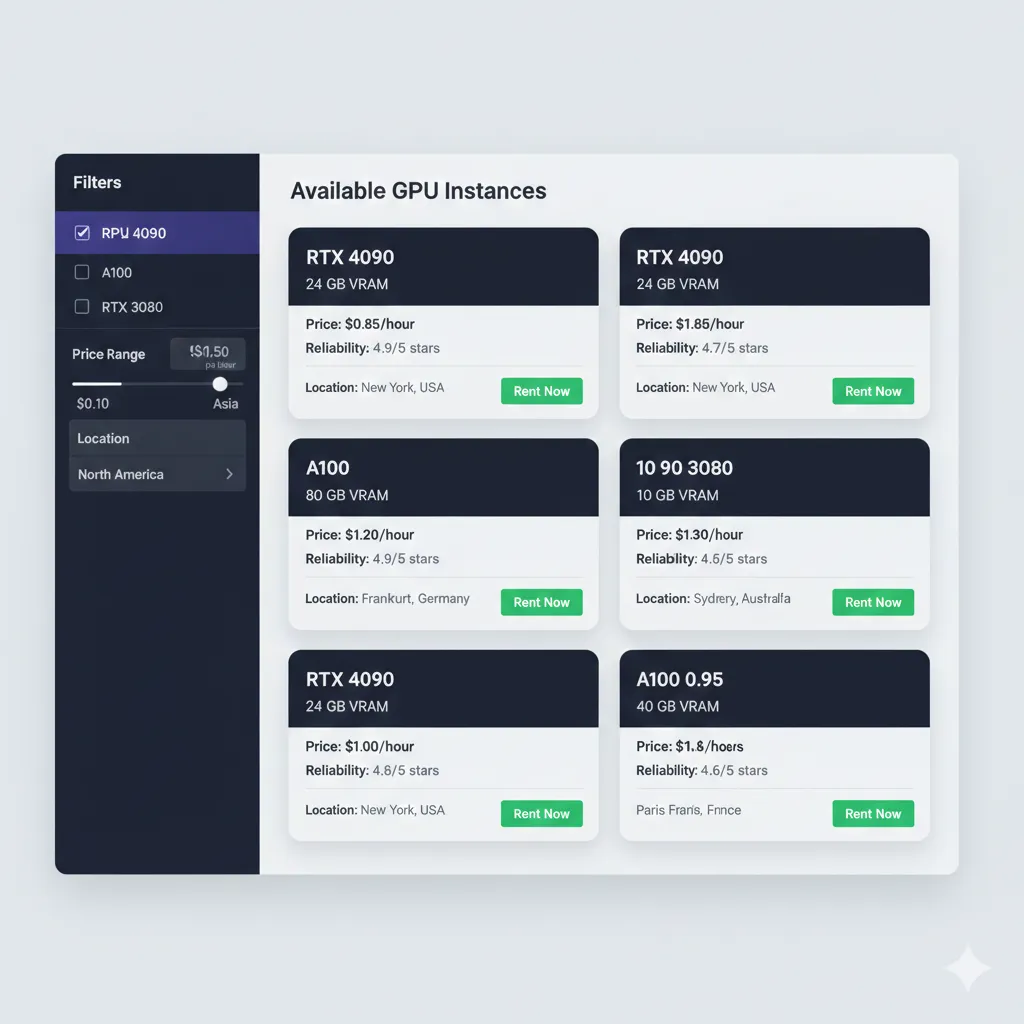
The marketplace displays available GPUs with real-time pricing:
Filter by requirements:
- GPU model (RTX 4090, RTX 3090, A100, etc.)
- Memory size
- Price range
- Provider reliability rating
- Geographic location
Evaluate providers:
Marketplace listings show provider statistics:
- Uptime percentage over past 30 days
- Total rentals completed
- Average user rating
- Response time to issues
Higher reliability providers charge modest premiums. For your first rental, prioritize reliability over absolute lowest price.
Review GPU specifications:
Click any listing to see detailed specifications:
- Exact GPU model and VRAM
- CPU cores and RAM
- Storage capacity and type
- Network bandwidth
- Installed software and drivers
Step 4: Deposit Funds and Approve Escrow
Once you’ve selected a GPU, you need to deposit funds into the smart contract escrow.
Initiate rental:
- Click “Rent Now” on your selected GPU listing
- Specify rental duration (or select hourly with no preset end time)
- Review total estimated cost including platform fees
Approve smart contract:
The first transaction approves the smart contract to access your cryptocurrency. This is a one-time permission per token type.
- MetaMask will prompt you to approve token spending
- Review the contract address (verify it matches the platform’s documented contract)
- Set approval amount (many users approve unlimited to avoid repeat approvals, though limited approval is more secure)
- Confirm the transaction and wait for blockchain confirmation (5-30 seconds on Polygon)
Deposit to escrow:
The second transaction moves funds from your wallet into the escrow contract.
- Specify the amount to deposit (minimum is rental cost; excess remains as platform credit)
- Review gas fee (typically $0.01-0.10 on Polygon)
- Confirm the transaction in MetaMask
- Wait for confirmation—rental will begin automatically once confirmed
Transaction fees explained:
You’ll pay two types of fees:
- Gas fee: Paid to blockchain validators in MATIC (typically $0.01-0.05 per transaction)
- Platform fee: Percentage of rental cost paid to marketplace (10-20% depending on platform)
The gas fee appears in MetaMask. The platform fee is included in the displayed rental price.
Step 5: Access Your Rented GPU
After escrow confirmation, GPU access activates within seconds.
Connection methods vary by platform:
Web-based terminal (GPUFlow, some Vast.ai providers):
- No software installation required
- Click “Open Terminal” in your rental dashboard
- Browser-based SSH/terminal interface appears
- Supports file upload/download through web interface
SSH access (most providers):
- Rental dashboard displays SSH credentials
- Connection string format:
ssh [email protected] -p port - Use terminal on Mac/Linux or PuTTY on Windows
- Authentication via provided password or SSH key
Remote desktop (Windows GPU instances):
- Download RDP client (built-in on Windows, download for Mac/Linux)
- Enter provided IP address and credentials
- Full Windows desktop interface appears
- Suitable for GUI-based applications
Jupyter notebook (pre-configured environments):
- Click provided Jupyter link in dashboard
- Browser-based Python notebook environment
- Common ML libraries pre-installed
- Good for interactive development and experimentation
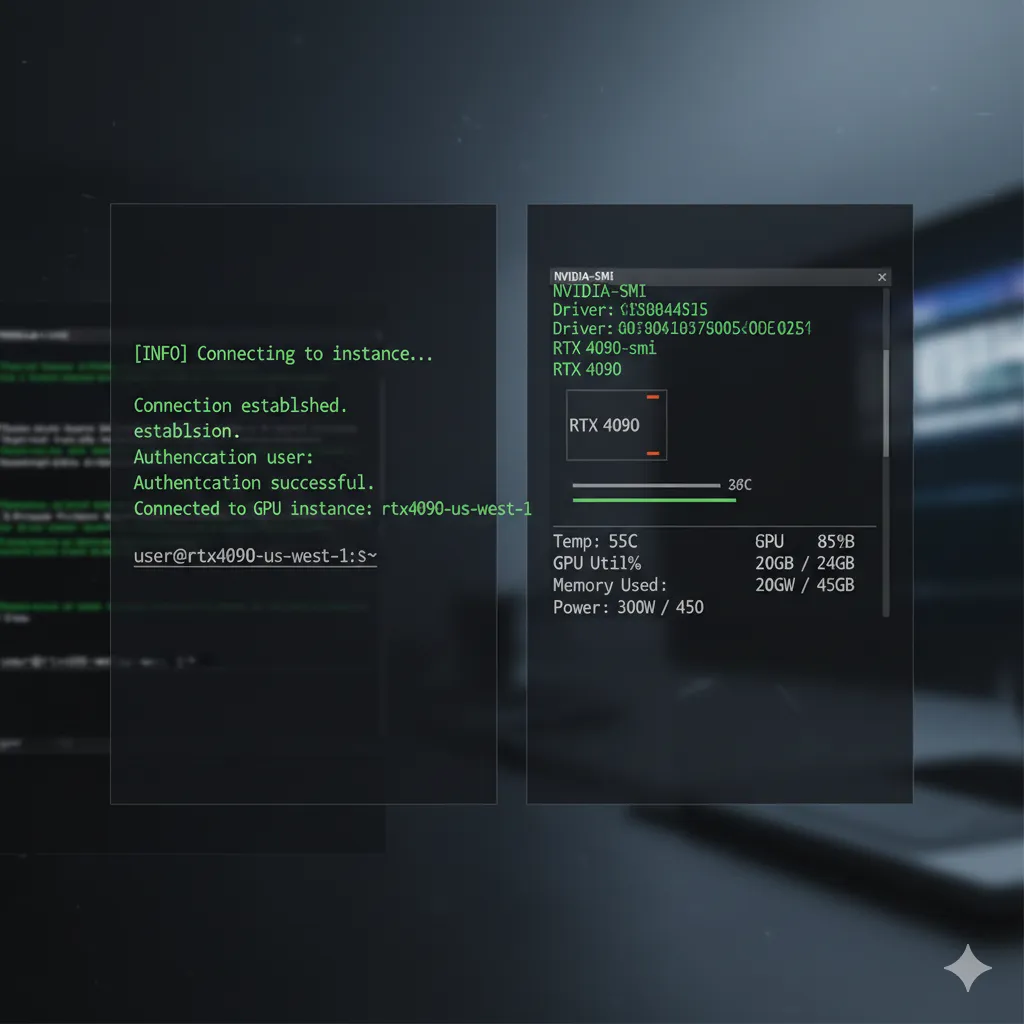
First connection verification:
Once connected, verify GPU availability:
nvidia-smiThis command displays GPU information including model, memory, temperature, and current utilization. Confirm the GPU matches your rental specifications.
Check CUDA installation:
nvcc --versionMost providers include CUDA toolkit pre-installed. Version should match your framework requirements (PyTorch, TensorFlow, etc.).
Step 6: Work on Your GPU and Monitor Usage
With GPU access established, you can begin your computational work. Effective session management minimizes costs.
Upload your data and code:
Via web interface:
- Most platforms provide file upload buttons in web terminals
- Drag-and-drop support for small files (under 100MB)
- Suitable for code files, configuration, small datasets
Via SCP/SFTP:
- Use
scpcommand or FileZilla for larger transfers - Example:
scp -P port localfile.tar.gz user@ip:/remote/path/ - More efficient for multi-GB datasets
Via cloud storage:
- Download directly to GPU instance from S3, Google Drive, or similar
- Avoids uploading through your connection
- Example:
wget https://your-bucket.s3.amazonaws.com/dataset.tar.gz
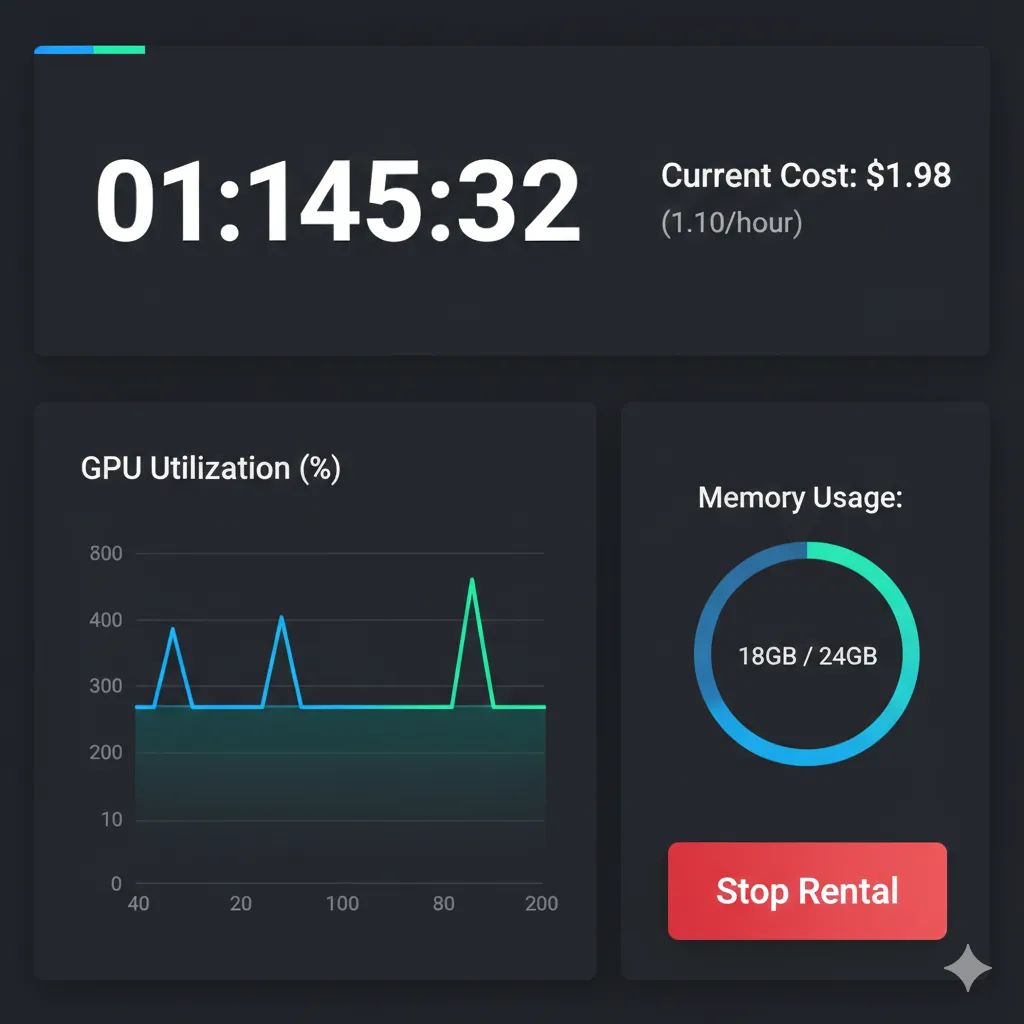
Monitor costs in real-time:
Platform dashboards display:
- Current session duration
- Cost accumulated so far
- Remaining credit balance
- Projected cost at current run rate
Set up alerts to notify you when credit balance reaches thresholds. This prevents unexpected session termination mid-training.
Resource monitoring:
Keep GPU utilization high to maximize value:
watch -n 1 nvidia-smiThis updates GPU statistics every second. Low utilization suggests bottlenecks in data loading, preprocessing, or code inefficiency.
Monitor CPU and RAM usage:
htopRental instances include CPU cores and system RAM alongside GPU. Utilize all resources you’re paying for.
Session management best practices:
Save work frequently:
- Checkpoint model weights every epoch
- Upload checkpoints to external storage
- Instance storage is temporary—deleted when rental ends
Use screen or tmux:
- Terminal multiplexers keep processes running if connection drops
- Reattach to sessions after disconnection without losing work
- Essential for multi-hour training runs
Example:
screen -S training
python train.py
# Press Ctrl+A then D to detach
# Later reconnect with: screen -r training
Optimize for cost efficiency:
- Prepare code and data before starting GPU rental
- Debug on local machines or CPU instances
- Use GPU time only for actual training/inference
- Terminate sessions immediately when work completes
Step 7: Complete Rental and Withdraw Funds
When your work finishes, properly terminate the rental to stop billing.
Manual termination:
- Click “Stop Rental” or “Terminate Instance” in platform dashboard
- Confirm termination—this action is immediate and irreversible
- Download any results before terminating
Automatic termination:
- Rentals with preset duration end automatically
- Ensure work completes before time expires
- Extend rental before expiration if needed
Final cost settlement:
Smart contract calculates final cost based on actual usage:
- Hourly rate × actual hours used (billed per second)
- Platform fee applied to total
- Unused escrowed funds returned automatically
Fund return process:
Unused escrow balance either:
- Returns automatically to your wallet (blockchain-based escrow)
- Remains as platform credit for future rentals (centralized platforms)
- Available for immediate withdrawal to wallet
For GPUFlow and smart-contract platforms:
- Unused funds release to your wallet within minutes
- No withdrawal request or approval needed
- Check wallet balance—funds appear automatically
For platform-credit systems:
- Navigate to withdrawal section
- Specify amount and destination wallet
- Approve withdrawal transaction
- Wait for platform processing (typically under 24 hours)
Transaction history:
Download rental receipts showing:
- Rental start and end timestamps
- Total duration and cost
- GPU specifications
- Transaction hashes (for blockchain-based payments)
Maintain records for expense tracking or business accounting.
Cost Optimization Strategies
Cryptocurrency payments reduce transaction overhead, but rental costs still accumulate based on GPU usage time. Strategic planning minimizes total expenditure.
Optimize Development Workflow
The most expensive mistake is burning GPU time on work that could happen locally.
Local development first:
- Write and debug code on your laptop or CPU instance
- Verify data pipelines work correctly
- Test with small data subsets locally
- Only move to GPU when ready for actual training
Example cost comparison:
- Debugging code for 3 hours on local machine: $0
- Debugging same code on rented RTX 4090 at $0.60/hr: $1.80
- Multiply this across dozens of debugging sessions: $50+ wasted
Prepare everything before rental:
- Download datasets to cloud storage accessible from GPU instance
- Package code and dependencies in Docker containers or conda environments
- Create setup scripts that configure environment automatically
- Document exact commands needed to start training
Goal: From GPU instance start to training running should take under 5 minutes.
Leverage Spot Pricing and Interruptible Instances
Some platforms offer discounted “spot” or “interruptible” instances that can be reclaimed with short notice.
Savings potential: 50-70% off on-demand pricing
Best for workloads that:
- Can checkpoint frequently (every few minutes)
- Resume from checkpoints automatically
- Tolerate interruption without data loss
Implementation approach:
- Modify training code to save checkpoints every N minutes
- Detect interruption signals from platform
- Save state and shut down gracefully
- Automatically resume from latest checkpoint when instance returns
Most deep learning frameworks support this:
# PyTorch example
if os.path.exists('checkpoint.pth'):
    checkpoint = torch.load('checkpoint.pth')
    model.load_state_dict(checkpoint['model'])
    optimizer.load_state_dict(checkpoint['optimizer'])
    start_epoch = checkpoint['epoch']
Batch Similar Workloads
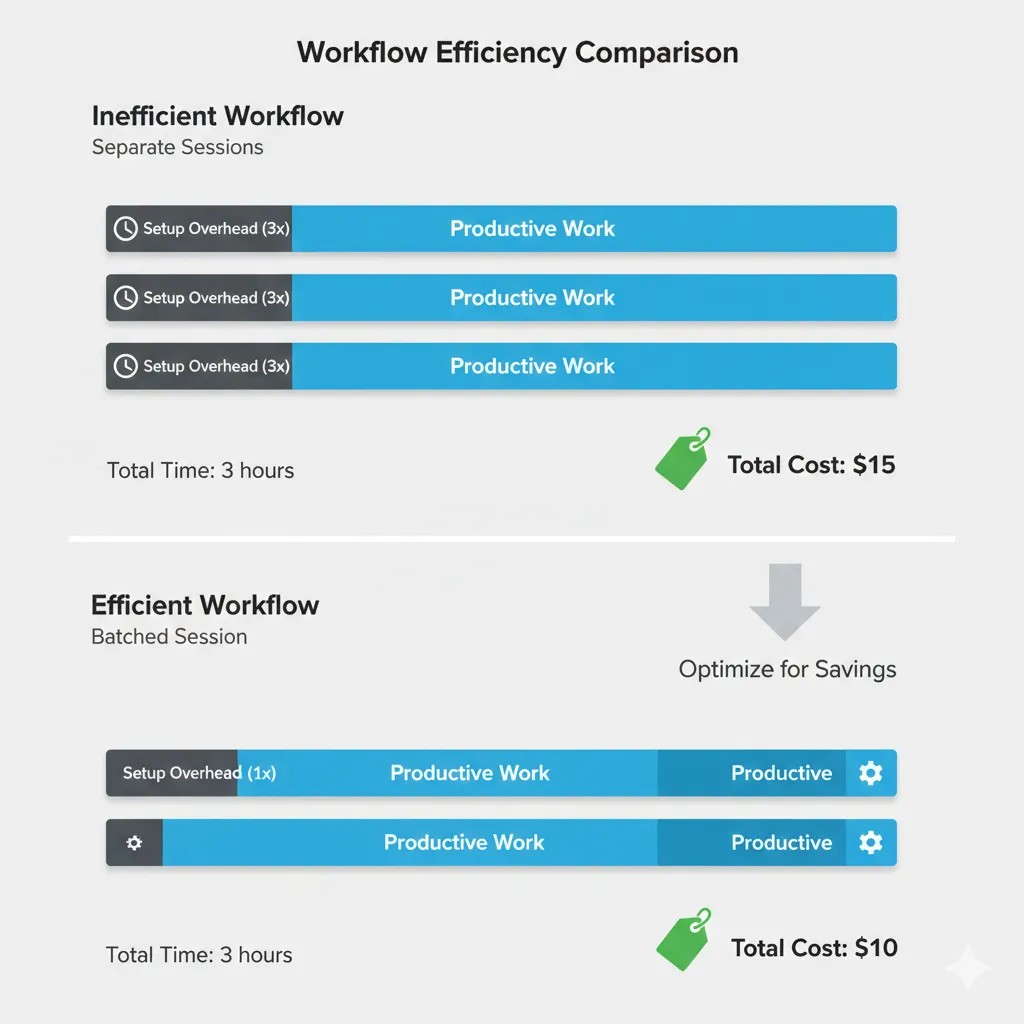
Rental overhead (connection setup, environment configuration, data transfer) is fixed per session. Amortize this across longer sessions.
Inefficient approach:
- Rent GPU for 1 hour to train model variant A
- Terminate, rent again to train variant B
- Repeat for variant C
- Total overhead: 15 minutes × 3 sessions = 45 minutes wasted
Efficient approach:
- Rent GPU for 3.5 hours
- Train all three variants in single session
- Overhead: 15 minutes once
- Savings: 30 minutes = $0.30+ depending on GPU
Prepare batch experiment scripts:
#!/bin/bash
python train.py --config config_a.yaml
python train.py --config config_b.yaml
python train.py --config config_c.yaml
python evaluate.py --all-models
Run this script on GPU instance and let it complete all work unattended.
Choose Appropriate GPU for Workload
Renting more GPU than needed wastes money. Renting insufficient GPU wastes time.
GPU selection criteria:
Memory requirements dominate choice:
- Model size and batch size determine minimum VRAM needed
- 8GB GPUs: Small models, inference, image classification
- 16-24GB GPUs: Most training tasks, Stable Diffusion, mid-size LLMs
- 40-80GB GPUs: Large language models, massive batch sizes
- 80GB+ GPUs: 70B+ parameter models, research-scale experiments
Compute requirements determine speed:
- Training speed scales with TFLOPS (floating-point operations per second)
- RTX 4090 offers best price/performance for FP16 workloads
- A100/H100 excel at FP8 and INT8 for LLM inference
- Older GPUs (V100, P100) rarely justify their pricing anymore
Cost example:
Training job requires 24GB VRAM, completes in:
- 2 hours on RTX 4090 ($0.60/hr) = $1.20 total
- 3 hours on RTX 3090 ($0.45/hr) = $1.35 total
- 1.5 hours on A100 ($1.40/hr) = $2.10 total
RTX 4090 provides best value despite higher hourly rate because faster completion time reduces total cost.
Use Preemptible Storage Wisely
GPU instances include temporary storage that deletes when rental ends. External storage costs extra.
Strategy:
- Download datasets directly to instance at session start
- Process and train
- Upload only final outputs (trained weights, results)
- Delete everything else—it disappears anyway when instance terminates
Minimize external storage:
- Don’t store intermediate checkpoints externally unless necessary
- Compress results before upload (trained models compress well)
- Use dataset caching when providers offer it
Example storage cost avoidance:
Training generates 50GB of checkpoints and logs:
- Storing all 50GB on S3: $1.15/month × indefinitely
- Storing only final 2GB model: $0.05/month
- Savings: $1.10/month per experiment
Over dozens of experiments, storage costs can exceed GPU rental costs.
Optimize Hyperparameters Intelligently
Random hyperparameter search burns GPU time. Intelligent search converges faster.
Use techniques like:
- Bayesian optimization (libraries: Optuna, Weights & Biases)
- Early stopping on validation metrics
- Multi-fidelity methods (test on subset before full dataset)
Example:
- Random search testing 50 configurations at 1 hour each: 50 hours
- Bayesian optimization finding optimal in 15 iterations: 15 hours
- Savings: 35 hours = $21+ at $0.60/hr
Many hyperparameter optimization libraries integrate with experiment tracking tools to automatically select configurations likely to perform well based on previous results.
Security Considerations and Best Practices
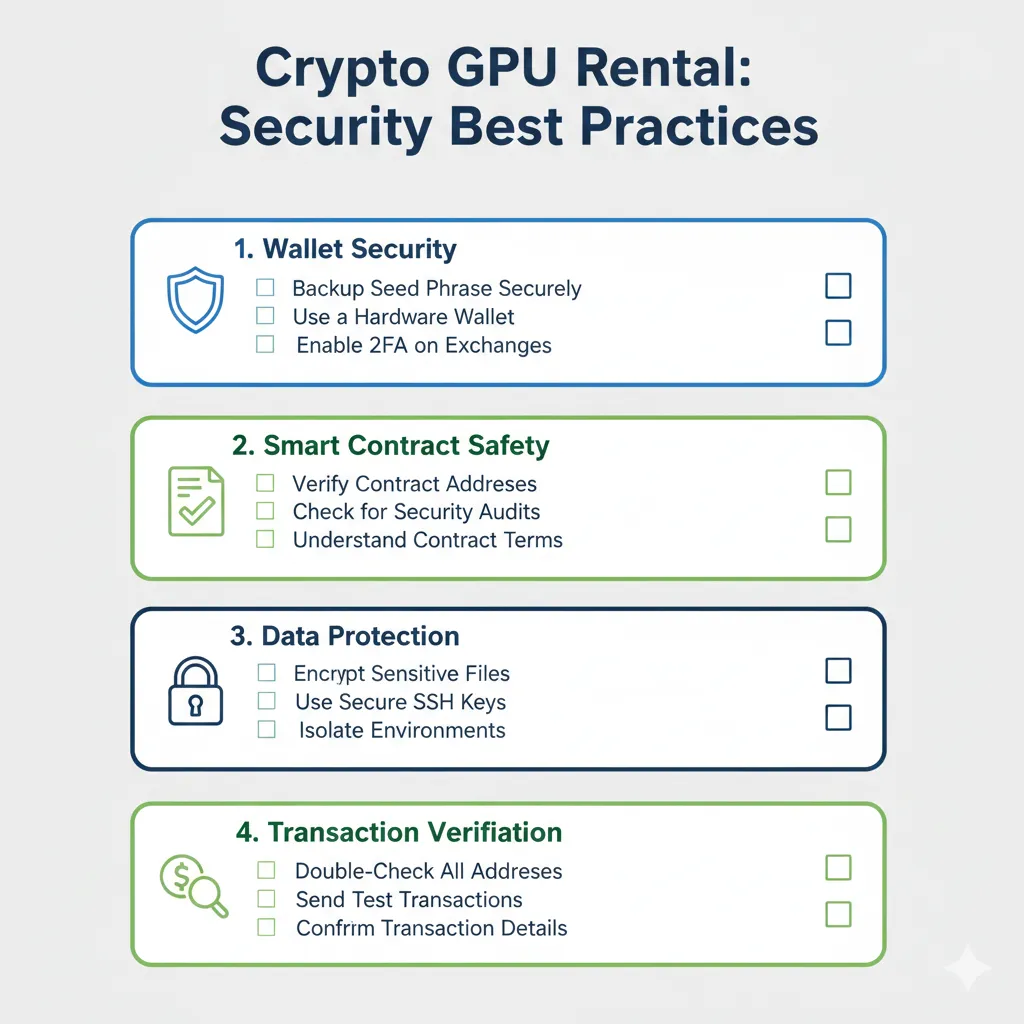
Cryptocurrency transactions are irreversible and pseudonymous. This provides privacy benefits but requires additional security diligence.
Wallet Security Fundamentals
Your cryptocurrency wallet is the only authentication mechanism for fund access. Compromise it, lose everything.
Seed phrase is supreme:
- 12-24 word phrase generated when creating wallet
- Provides complete access to all funds
- Never enter seed phrase on websites (legitimate platforms never request it)
- Store securely offline—physical copy in safe, encrypted digital backup
Browser extension risks:
MetaMask and similar browser wallets offer convenience but create attack surface:
- Phishing sites mimic legitimate platforms to steal approvals
- Malicious browser extensions can read wallet data
- Compromised computers may have keyloggers
Mitigation strategies:
- Use dedicated browser profile for crypto activities
- Verify URLs carefully before connecting wallet
- Bookmark legitimate platform URLs rather than searching
- Consider hardware wallet for significant funds
Smart Contract Interaction Safety
Connecting your wallet to websites grants those sites permission to request transactions. Malicious sites can drain funds through harmful contract approvals.
Before connecting wallet:
- Verify you’re on legitimate domain (check spelling, certificate)
- Research platform reputation (social media, reviews, community discussion)
- Start with small test amounts on unfamiliar platforms
When approving transactions:
MetaMask displays transaction details before confirmation:
- Contract address: Verify it matches platform’s documented contract
- Function being called: Understand what the transaction does
- Value: Amount being transferred
- Gas fee: Should be reasonable ($0.01-0.50 for typical transactions)
Red flags to reject:
- Unexpected transaction requests
- Requests for unlimited token approval on new platforms
- Gas fees exceeding $5 (on Polygon/Solana—indicates wrong network)
- Contract addresses different from documentation
Revoke unnecessary approvals:
Approved smart contracts retain permission until explicitly revoked. Periodically audit and revoke:
- Visit revoke.cash or similar approval management tools
- Connect wallet to see all active approvals
- Revoke approvals for unused platforms
Data and Computation Security
Rented GPUs are not secure environments. Providers can theoretically access instance contents.
Never store sensitive data on rented instances:
- Private keys or seed phrases
- Confidential business data
- Personal information requiring HIPAA/GDPR compliance
- Proprietary code or algorithms (unless encrypted)
For sensitive workloads:
- Encrypt data before uploading to instances
- Use confidential computing GPUs (limited availability)
- Consider dedicated rather than marketplace providers
- Implement additional access controls
Secure your SSH access:
- Use SSH keys instead of passwords when possible
- Change default passwords immediately
- Disable password authentication if supporting key-only
- Close sessions when not actively using
Monitor for unauthorized access:
- Review login history in instance logs
- Check for unexpected processes running
- Monitor network connections for suspicious activity
Most GPU rental instances run standard Linux distributions with default configurations. Hardening these systems falls on you if security requirements demand it.
Platform-Specific Risks
Different GPU rental platforms carry different risk profiles.
Smart contract platforms (GPUFlow):
- Risk: Contract vulnerabilities could lock or expose funds
- Mitigation: Platforms should publish audits, bug bounties
- Check: Contract code on blockchain explorers, community reputation
Centralized platforms (RunPod):
- Risk: Platform bankruptcy, account freezes, policy changes
- Mitigation: Don’t store large balances, withdraw regularly
- Check: Company registration, terms of service, community trust
Peer-to-peer marketplaces (Vast.ai):
- Risk: Individual provider dishonesty, service failures
- Mitigation: Choose highly-rated providers, start small
- Check: Provider uptime history, user reviews, community standing
Direct provider arrangements:
- Risk: Complete counterparty risk without platform mediation
- Mitigation: Use escrow services, start with minimal commitments
- Check: Provider reputation in community, verifiable history
No platform is risk-free. Distribute risk by:
- Not concentrating funds on single platform
- Limiting deposits to near-term rental needs
- Testing new platforms with minimal amounts
- Maintaining cryptocurrency across multiple wallets
Transaction Best Practices
Cryptocurrency transactions are irreversible. Mistakes result in permanent loss.
Before sending any transaction:
- Verify destination address character-by-character (malware can replace copied addresses)
- Confirm amount is correct
- Check network matches intended blockchain
- Ensure sufficient balance for amount plus gas fees
Test with small amounts first:
- Send minimum transaction to new addresses
- Confirm receipt before sending larger amounts
- One-time hassle prevents catastrophic errors
Common mistakes to avoid:
- Sending tokens to contract addresses (rather than deposit functions)
- Using wrong network (sending on Ethereum when platform expects Polygon)
- Insufficient gas tokens (needing MATIC for gas but only holding USDC)
- Copying wrong address from clipboard malware
If you make an error:
- Blockchain transactions cannot be reversed
- Funds sent to wrong addresses are permanently lost
- No customer service can recover mistaken transfers
- Prevention is the only protection
Privacy Considerations
Cryptocurrency provides pseudonymity, not anonymity. All transactions are publicly visible on blockchain explorers.
Blockchain transparency:
- Anyone can view your wallet balance and transaction history
- Address reuse links all activity to single identity
- Connecting address to real identity deanonymizes all transactions
Enhance privacy:
- Use different addresses for different purposes
- Avoid publicizing wallet addresses
- Consider privacy-focused chains for sensitive transactions
- Understand platform data retention policies
Platform tracking:
- GPU rental platforms log rental activity, connection IPs
- Payment processors (for platforms using them) collect transaction data
- Provider instances may log your computational activity
For complete privacy, you must address all layers: blockchain pseudonymity, platform policies, and provider trustworthiness.
Comparing Costs: Cryptocurrency vs Traditional Payments
Does paying with cryptocurrency actually save money compared to credit cards? The answer depends on transaction frequency and rental patterns.
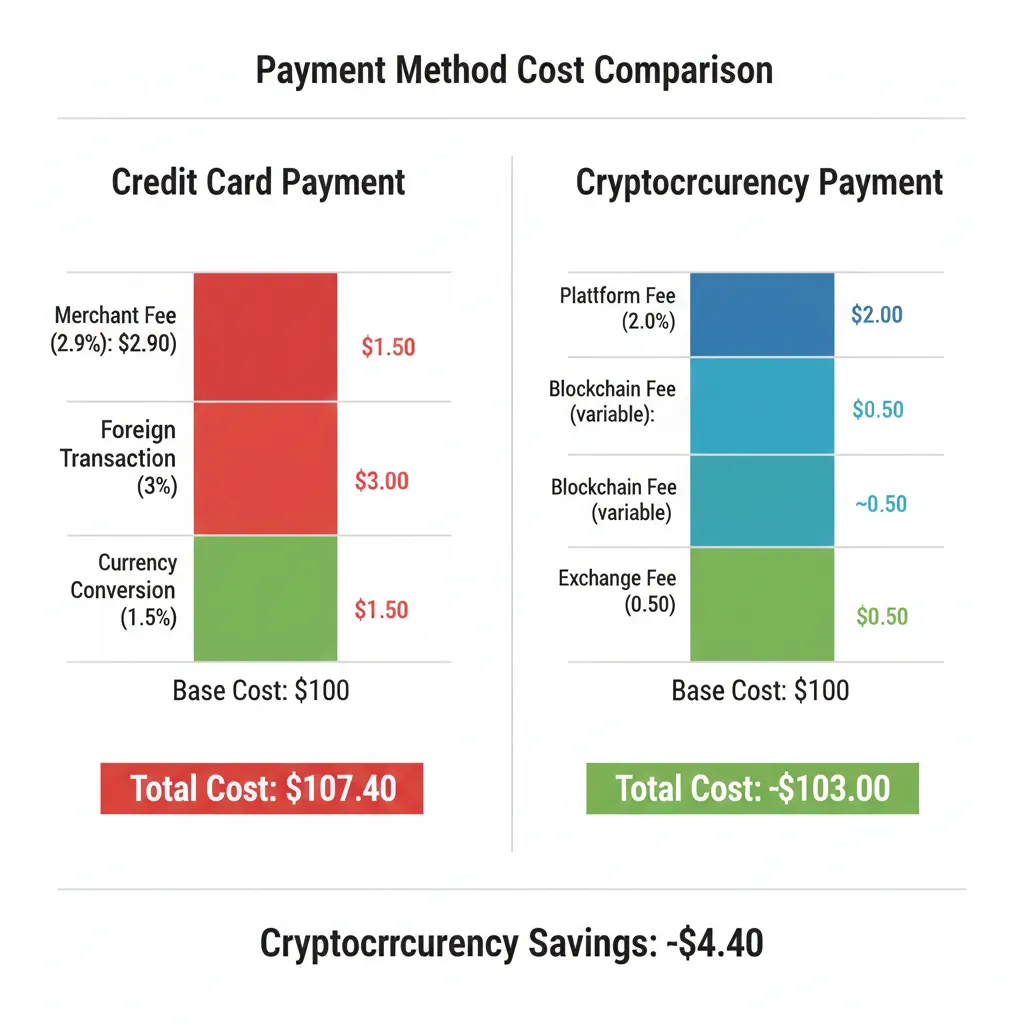
Transaction Fee Comparison
Cryptocurrency networks:
- Ethereum mainnet: $0.50-3.00 per transaction
- Polygon/Solana: $0.01-0.10 per transaction
- Bitcoin: $1-10 per transaction
Traditional payment methods:
- Credit card merchant fees: 2.5-3.5% of transaction + $0.30 fixed
- ACH/bank transfer: $0-1 fee, 2-5 business day settlement
- Wire transfer: $10-30 domestic, $30-50 international
Break-even analysis:
For a $50 GPU rental deposit:
- Credit card: $1.55-2.05 in merchant fees (passed to customer via pricing or fees)
- Polygon cryptocurrency: $0.05 transaction fee
- Savings: ~$1.50 per deposit
For a $500 GPU rental deposit:
- Credit card: $12.80-17.80 in fees
- Polygon cryptocurrency: $0.05 transaction fee
- Savings: ~$12.75 per deposit
Cryptocurrency becomes more economical as transaction size increases. Credit card percentage fees scale with amount; blockchain transaction fees remain constant.
Platform Fee Differences
Cryptocurrency-native platforms often charge lower platform fees due to reduced operational overhead.
Typical platform fees:
- AWS/Azure/GCP: Built into pricing (effective 200-400% markup on hardware cost)
- RunPod: ~20% platform fee
- Vast.ai: ~20% platform fee
- GPUFlow: 10-15% platform fee
Lower fees at crypto-native platforms reflect:
- No payment processing fees (2.5-3.5% eliminated)
- No chargeback risk or fraud reserves
- Reduced customer support overhead (smart contracts handle disputes)
- Smaller compliance and regulatory burden
Example on $100 GPU rental:
- Platform with 20% fee: $20 to platform, $80 to provider
- Platform with 12% fee: $12 to platform, $88 to provider
- Additional value to provider enables competitive pricing
Hidden Costs to Consider
Cryptocurrency payments eliminate some costs but introduce others.
Eliminated costs:
- Credit card foreign transaction fees (typically 1-3%)
- Currency conversion fees
- International wire transfer fees
- Payment processor monthly fees (for providers)
New costs:
- Initial cryptocurrency acquisition fees (exchange trading fees 0.1-0.5%)
- Blockchain transaction fees (variable by network)
- Spread between buy/sell prices on exchanges (0.1-1%)
- Potential tax implications of cryptocurrency transactions
Net result varies by geography:
- International users save most (avoiding currency conversion, international fees)
- US users with good credit cards see modest savings
- Users in cryptocurrency-friendly jurisdictions maximize benefits
Speed and Accessibility Value
Beyond direct costs, cryptocurrency payments offer convenience value.
Instant access benefits:
- Credit cards: 24-72 hour hold periods for fraud checks (common for new users)
- Bank transfers: 2-5 business days settlement
- Cryptocurrency: 1-60 minute confirmation, immediate access
For time-sensitive workloads, rapid access has value beyond dollar cost savings.
Geographic accessibility:
- Traditional payments: Require bank accounts, credit history, supported countries
- Cryptocurrency: Accessible globally with internet connection
- Value is infinite for users in unsupported regions
Total Cost of Ownership Example
Scenario: Developer in Brazil renting GPUs for 20 hours monthly for ML training
Traditional payment path (RunPod with credit card):
- Base rental: 20hr × $0.59 = $11.80
- International credit card fee (3%): $0.35
- Currency conversion BRL→USD (1% spread): $0.12
- Total: $12.27
Cryptocurrency payment path (GPUFlow):
- Base rental: 20hr × $0.65 = $13.00
- Polygon transaction fee: $0.05
- USDC acquisition fee (0.5%): $0.07
- Total: $13.12
Difference: $0.85 more expensive via cryptocurrency in this scenario.
But consider:
- No fraud hold delays (access in 2 minutes vs 48 hours)
- No KYC documentation required
- Privacy benefits
- Lower platform fee (12% vs 20%) partially offsets higher hourly rate
Value depends on individual priorities beyond pure cost.
Common Problems and Troubleshooting
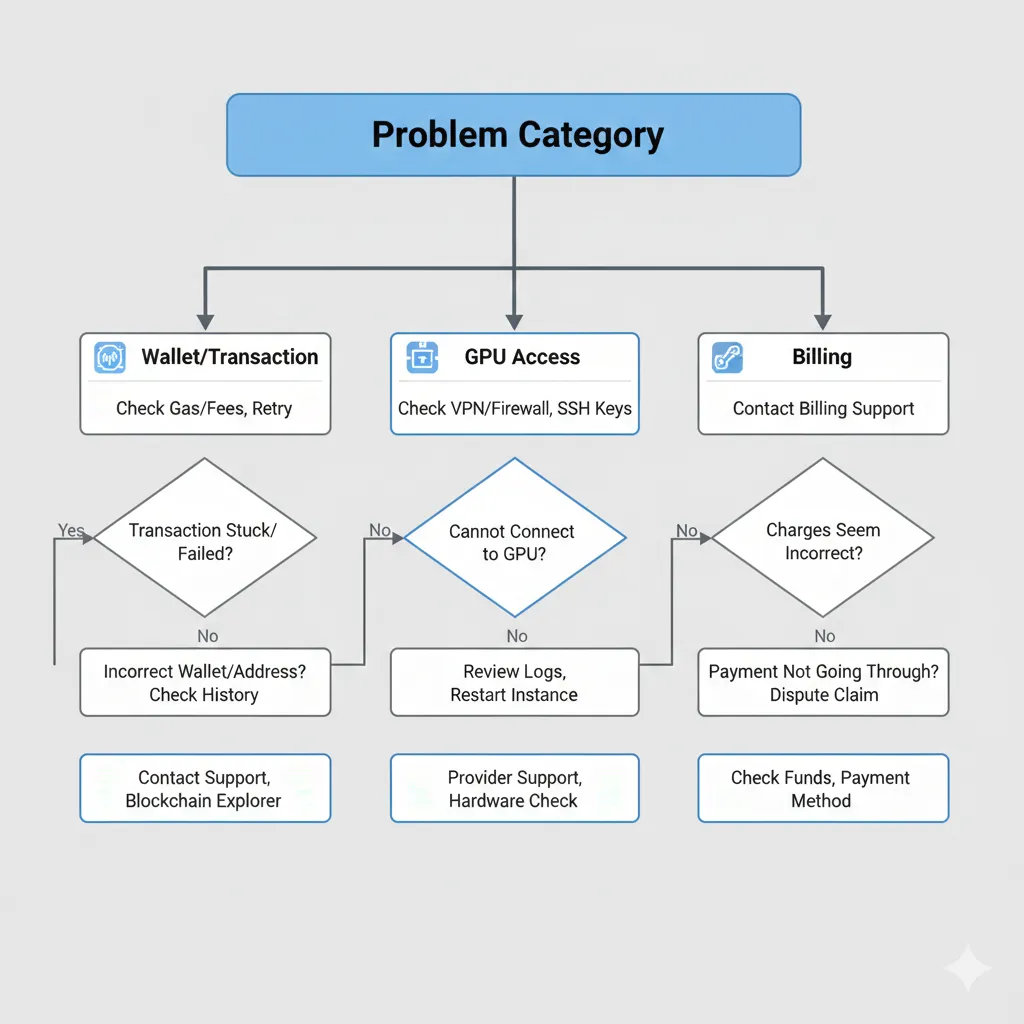
Cryptocurrency GPU rental combines two technical domains, creating unique troubleshooting scenarios. This section addresses frequent issues and their solutions.
Wallet Connection Problems
Problem: MetaMask won’t connect to platform
Common causes and solutions:
Browser compatibility issues:
- MetaMask works best on Chrome, Firefox, Brave
- Safari support is limited—switch browsers if problems persist
- Clear browser cache and cookies, restart browser
- Disable conflicting extensions temporarily
Wrong network selected:
- Check MetaMask shows correct network (Polygon, Ethereum, Solana)
- Click network dropdown and switch to required network
- Platform will usually prompt to switch if wrong network detected
Outdated wallet version:
- MetaMask updates automatically but may need manual update
- Check chrome://extensions/ for update button
- Reinstall MetaMask if persistent issues (wallet recovers from seed phrase)
Problem: Transaction fails with “insufficient funds” despite adequate balance
This confusing error usually means insufficient gas token, not insufficient payment token.
Solution:
- You need native network token for gas fees (MATIC on Polygon, ETH on Ethereum)
- Having USDC balance doesn’t help if you lack MATIC for gas
- Acquire small amount of gas token (usually $1-5 worth sufficient)
- Many platforms offer free gas token faucets for new users
Problem: Wallet shows different balance than platform
Causes:
- Platform displays balance in escrowed smart contract, wallet shows main address balance
- Different networks (checking Ethereum balance when funds are on Polygon)
- Transaction still pending confirmation
Solution:
- Wait 1-2 minutes for blockchain confirmation
- Verify you’re viewing correct network in wallet
- Check platform’s deposit address on blockchain explorer to confirm transaction completed
- Refresh both wallet and platform page
Transaction and Escrow Issues
Problem: Transaction pending for extended time
Normal wait times:
- Polygon: 5-30 seconds
- Ethereum: 1-5 minutes
- Solana: 1-3 seconds
- Bitcoin: 10-60 minutes
If exceeded:
- Check blockchain explorer (Polygonscan, Etherscan) using transaction hash
- Look for transaction status: pending, confirmed, or failed
- Failed transactions return funds but consume gas fees
Speed up stuck transactions:
- MetaMask offers “Speed Up” option to increase gas price
- This submits replacement transaction with higher fee
- Only works while original transaction still pending
Problem: Escrow contract won’t release funds after rental completion
First verify rental actually ended:
- Check platform dashboard for session status
- Some platforms require manual “End Rental” action
- Automatic end based on time may have slight delay
If legitimately stuck:
- Smart contract platforms: Check contract on blockchain explorer for recent activity
- Look for open dispute or pending release transaction
- Contact platform support with transaction hash and wallet address
- Centralized platforms usually resolve within 24-48 hours
Problem: Sent funds to wrong address or wrong network
Unfortunately, this is usually unrecoverable.
Ethereum/Polygon address confusion:
- Same address works on both networks (they use identical address format)
- Funds sent to your address on wrong network still belong to you
- Add the correct network to MetaMask to see the funds
- Not actually lost, just on unexpected network
Completely wrong address:
- Blockchain transactions are irreversible
- No customer service can recover funds
- Consider funds permanently lost
- Prevention through careful verification is only protection
GPU Access and Performance Issues
Problem: Cannot connect to GPU instance after rental starts
Check basics first:
- Rental status shows “Active” on platform dashboard
- Received connection details (IP address, port, credentials)
- Instance has finished initialization (can take 30-60 seconds)
Connection refused errors:
- Verify correct IP address and port number
- Check if your network blocks outgoing SSH connections (corporate firewalls, some ISPs)
- Try connection from different network (mobile hotspot) to isolate issue
- Some providers require whitelist of your IP address—check platform settings
Authentication failures:
- Verify password copied correctly (no extra spaces)
- Username is case-sensitive
- SSH key authentication requires private key matches uploaded public key
- Try password reset option if available
Problem: GPU not detected or shows wrong model
Verify with nvidia-smi:
nvidia-smiIf this command fails:
- Drivers not installed or not loaded properly
- Contact provider support—this is infrastructure issue
- Request different instance or provider
If shows wrong GPU model:
- Provider listed wrong specifications (report to platform)
- Request refund and select different provider
- Check provider reliability rating—low ratings often correlate with mismatched hardware
Problem: GPU performance significantly below expected
Benchmark actual performance:
# Install benchmark tool
pip install torch torchvision

# Run simple benchmark
python -c "import torch; x=torch.randn(10000,10000).cuda(); torch.mm(x,x); print('Success')"
Compare training speed against local benchmarks or published results for same GPU model.
Common performance issues:
- Thermal throttling (GPU overheating—check temperature in nvidia-smi)
- Shared instance (provider overselling—multiple users on same GPU)
- CPU bottleneck (slow data loading, check CPU usage)
- Network bottleneck (slow dataset downloads)
Solutions:
- Request different instance if hardware issue
- Optimize code to reduce CPU/network bottlenecks
- Choose providers with better reliability ratings
- Report severe performance issues to platform for potential refund
Payment and Billing Disputes
Problem: Charged for time after terminating rental
Verify termination timestamp:
- Check platform transaction history for exact end time
- Smart contract platforms: View contract on blockchain explorer
- Billing is typically per-second, rounded up
If overcharged:
- Calculate expected cost: (end_time - start_time) × hourly_rate
- Compare against actual charge
- Small discrepancies (under 1 minute) are rounding
- Larger discrepancies warrant support ticket
Platform-specific resolution:
- Smart contract platforms: Dispute mechanism built into contract
- Centralized platforms: Support ticket with transaction evidence
- Most platforms resolve legitimate billing errors within 48 hours
Problem: Platform won’t release escrowed funds or credits
For smart contract platforms:
- Contract release should be automatic based on code
- Check if rental duration requirement met
- Verify no active dispute flag on rental
- Blockchain explorer shows contract state
For centralized platforms:
- Withdrawal request may require processing time (24-48 hours typical)
- Check for minimum withdrawal amounts
- Verify KYC completion if required for withdrawals
- Support ticket if exceeds stated processing time
Problem: Cryptocurrency value dropped during rental period
This is market risk, not platform issue, but affects effective rental cost.
Example:
- Deposit $100 USDC, rent GPU for 10 hours at $0.60/hr = $6 cost
- $94 USDC remains
- If you deposited ETH worth $100, and ETH drops 10%, you have $90.60 worth of ETH
Mitigation:
- Use stablecoins (USDC, USDT) to eliminate volatility
- Only deposit amounts needed for immediate rental
- Convert cryptocurrency earnings to stablecoins if not using soon
Tax and Regulatory Considerations
Cryptocurrency transactions create tax reporting obligations in most jurisdictions. GPU rental adds business expense considerations.
Disclaimer: This section provides general information, not tax advice. Consult qualified tax professionals for your specific situation.
Cryptocurrency Tax Basics
Most tax authorities treat cryptocurrency as property, not currency. This creates tax events on transactions.
Taxable events include:
- Converting fiat currency to cryptocurrency (establishes cost basis)
- Trading one cryptocurrency for another (capital gain/loss)
- Spending cryptocurrency on services like GPU rental (capital gain/loss)
- Receiving cryptocurrency as income (ordinary income)
Non-taxable events:
- Transferring cryptocurrency between your own wallets
- Holding cryptocurrency without transactions
GPU Rental as Business Expense
If renting GPUs for business purposes, rental costs are typically deductible expenses.
For businesses and self-employed:
- GPU rental costs deduct as ordinary business expense
- Cryptocurrency used for payment doesn’t change expense deductibility
- Must calculate fair market value of cryptocurrency at time of payment
- Maintain records: rental receipts, transaction hashes, date, USD value
Example calculation:
- Rent GPU for $50 worth of ETH
- Your ETH cost basis was $40
- Business deducts $50 expense
- You also report $10 capital gain on cryptocurrency disposition
For employees:
- Unreimbursed employee expenses generally not deductible (post-2017 US tax law)
- Employer reimbursement creates no tax impact for employee
- Employer treats reimbursement as business expense
For investors and traders:
- GPU rental for managing investments may qualify as investment expense
- Treatment varies significantly by jurisdiction
- Some regions allow deductions, others don’t
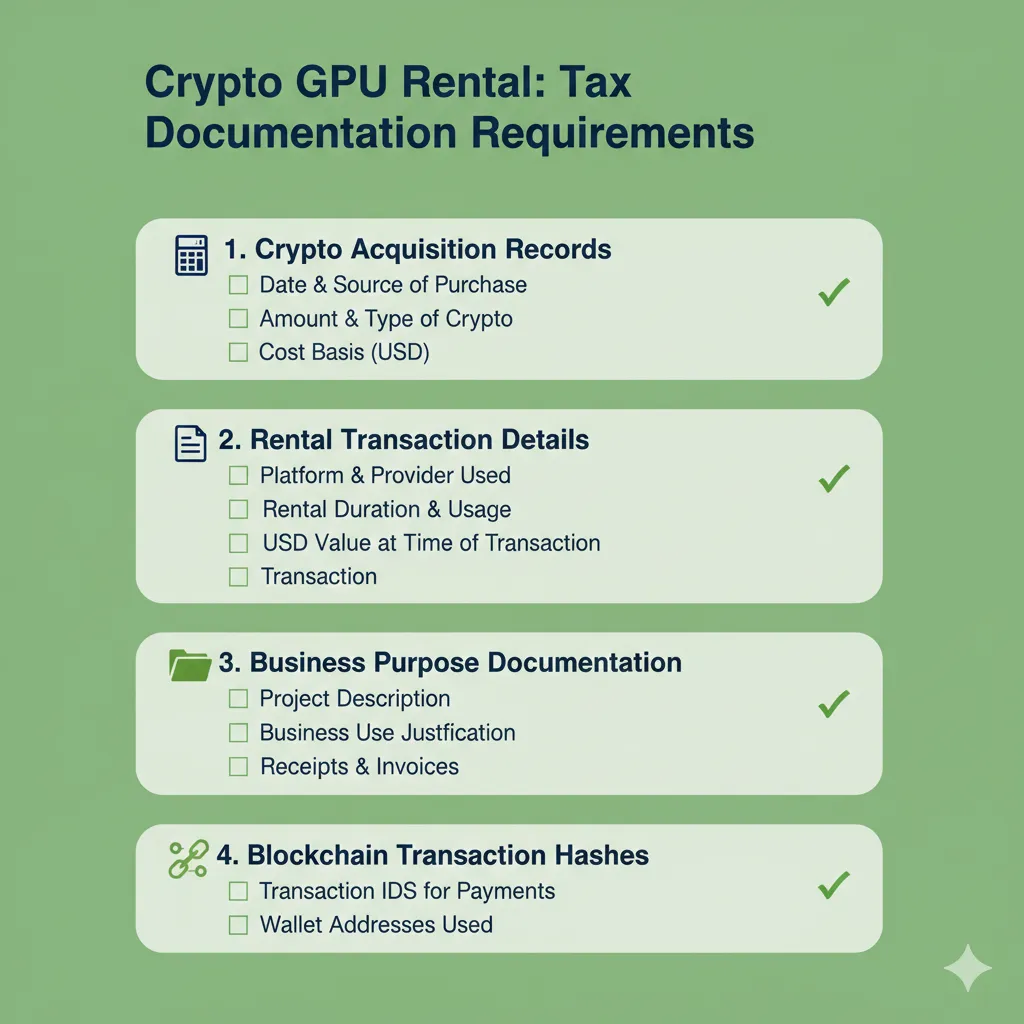
Record Keeping Requirements
Proper documentation is essential for tax compliance and audit defense.
Maintain records of:
Cryptocurrency acquisition:
- Date and time purchased
- Amount of cryptocurrency acquired
- Purchase price in local currency
- Exchange or platform used
- Transaction fees paid
GPU rental transactions:
- Platform name and rental details
- Date and duration of rental
- Cryptocurrency amount spent
- USD/local currency equivalent at time of transaction
- Transaction hash on blockchain
- Business purpose of rental
Cryptocurrency disposition:
- Calculate gain/loss: (fair market value at use) - (cost basis)
- Document fair market value using exchange rates from transaction time
- Major exchanges provide historical price data
Recommended tools:
- CoinTracker, Koinly, or similar crypto tax software
- These import exchange transactions and calculate gains automatically
- Manual entry required for P2P transactions
- Generate tax forms (8949, Schedule D in US) directly
Cross-Border Considerations
Cryptocurrency’s borderless nature creates complex tax scenarios.
Platform location vs user location:
- Your tax obligations depend on your residence/citizenship
- Platform location generally irrelevant for user tax
- US citizens owe US taxes regardless of platform location
- Non-US users typically don’t owe US taxes on foreign platform transactions
Reporting thresholds:
- Many countries require reporting cryptocurrency holdings above thresholds
- US: FBAR filing required if foreign accounts exceed $10,000
- Cryptocurrency on foreign exchanges may trigger reporting
- Penalties for non-reporting can exceed account values
VAT/GST on services:
- Some jurisdictions charge consumption tax on digital services
- B2B transactions may be reverse-charge (customer pays VAT)
- B2C transactions may require platform to collect VAT
- Cryptocurrency payment doesn’t exempt from consumption taxes
KYC and Privacy Implications
No-KYC platforms offer privacy but create documentation challenges.
Tax authority expectations:
- You must report income and gains regardless of platform reporting
- “They didn’t send me a 1099” is not a legal tax avoidance strategy
- Burden of proof falls on taxpayer in audits
Privacy vs compliance:
- Pseudonymous transactions still require tax reporting
- Blockchain transparency means transactions are traceable
- Tax authorities increasingly use blockchain analysis
- Privacy coins or mixing services attract scrutiny
Audit risk factors:
- Large cryptocurrency holdings with minimal reported gains
- Lifestyle inconsistent with reported income
- Cryptocurrency exchange information sharing with tax authorities
Regulatory Landscape Changes
Cryptocurrency regulation is evolving rapidly.
Recent and upcoming changes:
- Infrastructure Investment Act (2021, US): Broker reporting requirements
- Markets in Crypto-Assets (MiCA, EU): Comprehensive crypto regulation framework
- Many jurisdictions implementing travel rule for crypto transactions
Impact on GPU rental:
- Platforms may require more KYC to comply with regulations
- Transaction reporting to tax authorities may increase
- No-KYC options may decrease over time
Staying compliant:
- Assume stricter reporting in future
- Maintain records even if not currently required
- Consult tax professionals familiar with cryptocurrency
- Consider compliance cost when choosing platforms
Future of Cryptocurrency GPU Rental
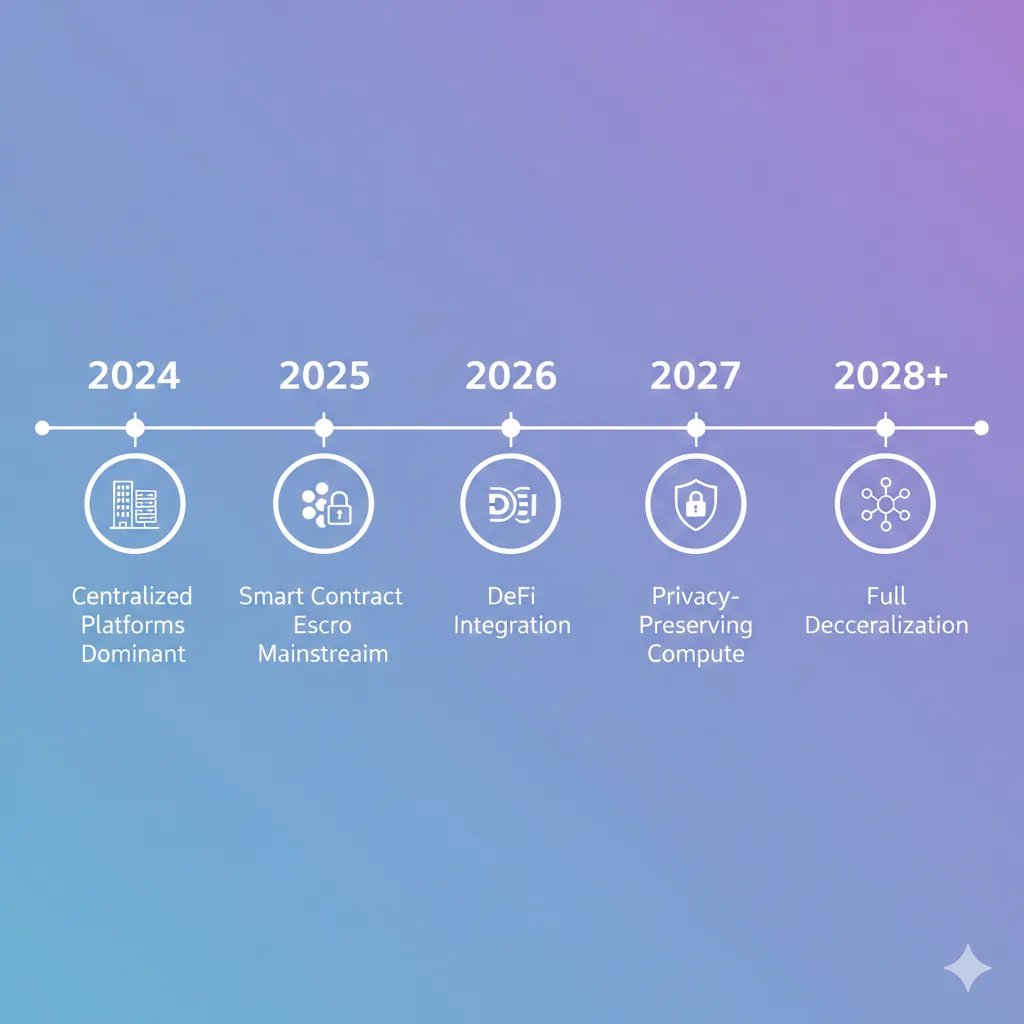
The convergence of cryptocurrency payments and GPU rental is accelerating. Several trends will shape the market’s evolution.
Decentralized Compute Networks
Current GPU rental platforms aggregate supply centrally. Emerging protocols eliminate this intermediary entirely.
Render Network, Akash Network, Golem:
- Fully decentralized marketplaces operating on smart contracts
- Providers list resources directly on blockchain
- Renters discover and pay via protocol tokens
- No platform operator—code mediates all interactions
Advantages of full decentralization:
- Elimination of platform risk (shutdown, policy changes)
- Global censorship resistance
- Potentially lower fees (no central operator)
- Token holder governance of protocol parameters
Current limitations:
- Smaller provider networks than established platforms
- Less mature user interfaces
- Higher technical knowledge required
- Token price volatility creates pricing complexity
Trajectory: As protocols mature and interfaces improve, decentralized compute will capture growing market share from centralized platforms.
Integration with DeFi Ecosystems
Cryptocurrency GPU rental increasingly intersects with decentralized finance.
Yield-bearing collateral:
- Deposit stablecoins, earn yield, spend interest on GPU rental
- Protocols like Aave, Compound enable this today
- “Free” GPU rental funded by DeFi yields
- Requires larger capital base but eliminates out-of-pocket cost
NFT-gated access:
- Hold specific NFT to access discounted GPU pricing
- Provider reputation as non-transferable NFTs
- Rental history stored on-chain as credential system
Tokenized compute credits:
- GPU rental platforms issuing tradeable compute tokens
- Buy tokens at discount, use later or trade on secondary markets
- Creates liquid market for compute resources
DAO-operated providers:
- Community-owned GPU infrastructure
- Token holders vote on pricing, provider standards, platform development
- Profits distributed to token holders as dividends
Privacy-Preserving Computation
Current GPU rental requires trusting providers with data access. Cryptographic advances enable privacy-preserving alternatives.
Confidential computing:
- Hardware-encrypted secure enclaves (AMD SEV, Intel SGX)
- Provider cannot access data being processed
- Limited GPU support currently—mainly CPU workloads
Homomorphic encryption:
- Computation on encrypted data without decryption
- Results remain encrypted until customer decrypts
- Currently too slow for practical ML training
- Research advancing rapidly—may become viable 2026-2028
Federated learning approaches:
- Model training without centralizing data
- GPU providers compute on local data only
- Gradient aggregation preserves privacy
- Already used in production by Google, Apple
Zero-knowledge proofs:
- Prove computation completed correctly without revealing inputs
- Enables verifiable computation on sensitive data
- zkML (zero-knowledge machine learning) emerging field
Enterprise Adoption
Cryptocurrency payment remains niche, but enterprise interest is growing.
Corporate treasury cryptocurrency holdings:
- Companies increasingly hold Bitcoin, stablecoins on balance sheets
- Spending cryptocurrency for services avoids conversion friction
- Tax treatment improving as accounting standards mature
Cross-border efficiency:
- Multinational teams accessing GPU resources with single payment system
- No currency conversion, unified accounting
- Real-time settlement vs days for international wires
Smart contract automation:
- Enterprises can automate GPU procurement through smart contracts
- Auto-scaling based on demand without manual payment approval
- Integration with existing cloud infrastructure
Barriers to overcome:
- Compliance and audit requirements
- Risk management and treasury policies
- Procurement processes designed for traditional vendors
Regulation and Standardization
Regulatory clarity will shape market structure.
Potential regulatory developments:
Licensing requirements:
- GPU rental platforms may face money transmission licensing
- KYC/AML requirements could become mandatory
- Would eliminate current no-KYC options
- Industry may split: compliant providers vs offshore/decentralized alternatives
Consumer protections:
- Escrow requirements for customer fund protection
- Service level guarantees and dispute resolution standards
- Refund policies and customer rights frameworks
Tax reporting automation:
- Platforms may be required to issue tax forms
- Transaction reporting to revenue authorities
- Reduced privacy, increased compliance burden
Positive outcomes:
- Regulatory clarity enables institutional adoption
- Consumer protections reduce fraud
- Standardization improves interoperability
Negative outcomes:
- Compliance costs increase platform fees
- Privacy-preserving options eliminated
- Innovation constrained by regulatory burden
Hardware Evolution
GPU hardware changes will impact rental markets.
Specialized AI accelerators:
- Google TPU, AWS Trainium, Cerebras WSE
- Optimized for specific workloads vs general-purpose GPUs
- May fragment rental market into specialized niches
Consumer GPU capabilities:
- RTX 5090 (32GB VRAM) rivals previous-generation datacenter cards
- Gaming GPU rental becomes viable for larger models
- Peer-to-peer supply increases as gamers monetize idle hardware
Energy efficiency improvements:
- Lower power consumption reduces provider costs
- Enables competitive pricing against hyperscalers
- Environmental considerations favor efficient hardware
Memory capacity growth:
- 128GB, 256GB GPUs emerging
- Enables larger models on single GPUs
- May reduce demand for multi-GPU configurations
Platform-Specific Quick Start Guides
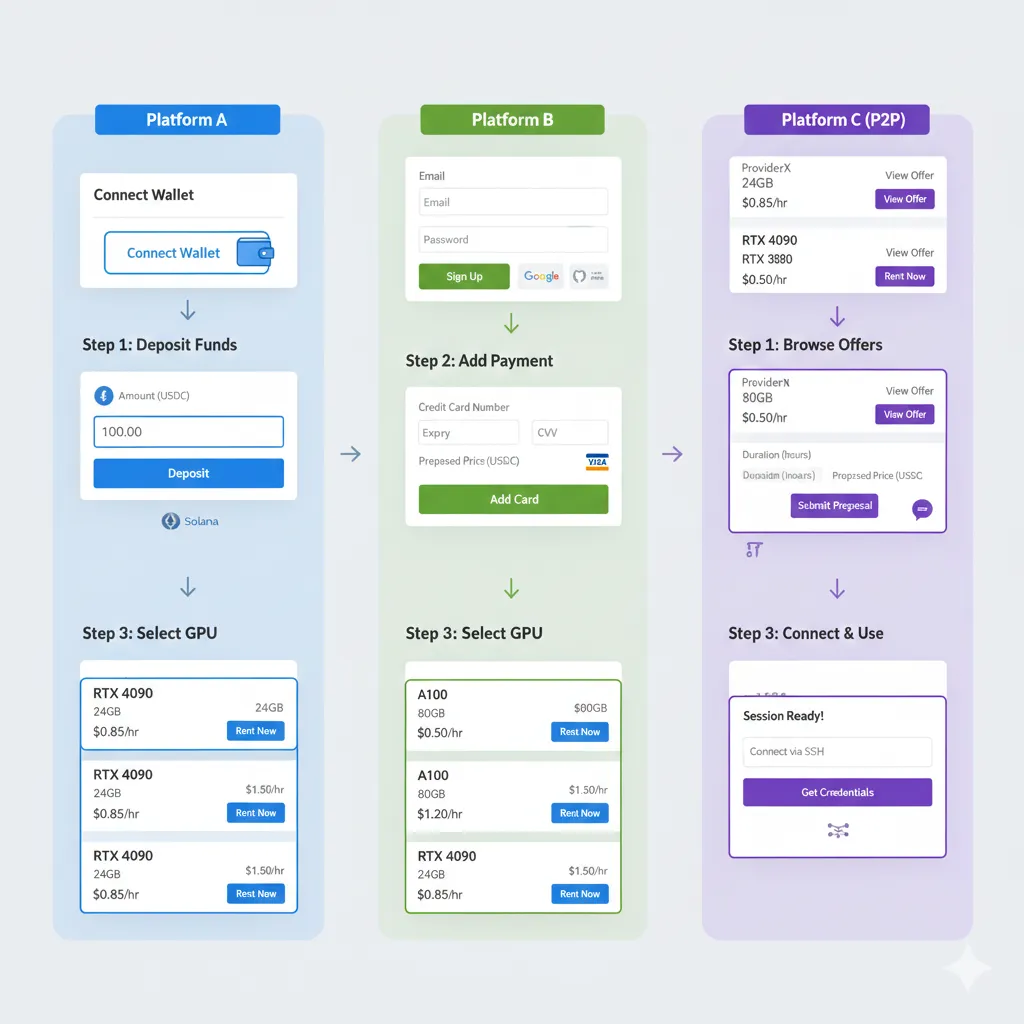
Step-by-step instructions for the most popular cryptocurrency-accepting GPU rental platforms.
GPUFlow Quick Start
Time required: 5 minutes
Prerequisites: MetaMask wallet, $20+ in MATIC or USDC on Polygon network
Step 1: Connect wallet
- Visit gpuflow.app
- Click “Connect Wallet” (top right)
- Select MetaMask, approve connection
- Wallet address appears in header—connection successful
Step 2: Deposit funds
- Click wallet address dropdown
- Select “Deposit Funds”
- Choose token (MATIC, USDC, ETH)
- Enter amount, click “Deposit”
- Approve transaction in MetaMask (gas fee ~$0.02)
- Wait 10-20 seconds for confirmation
Step 3: Select GPU
- Browse marketplace or use filters (GPU model, price range, location)
- Click any listing to see details
- Review provider rating (aim for 4.5+ stars, 95%+ uptime)
- Click “Rent Now”
Step 4: Start rental
- Specify rental duration or select “hourly” for open-ended
- Review total cost estimate
- Click “Confirm Rental”
- Approve escrow transaction in MetaMask
- Wait for confirmation (~15 seconds)
Step 5: Access GPU
- “Open Terminal” button appears after escrow confirms
- Click to open web-based SSH terminal
- No additional software needed
- Run
nvidia-smito verify GPU
Step 6: Complete rental
- Click “Stop Rental” when finished
- Confirm termination
- Final cost calculated and paid from escrow
- Unused balance returned to wallet automatically
Vast.ai Quick Start
Time required: 10 minutes
Prerequisites: None—create account during process
Step 1: Create account
- Visit vast.ai
- Click “Sign Up”
- Provide email, create password
- Verify email address
Step 2: Add credit via cryptocurrency
- Navigate to Account → Billing
- Click “Add Credit”
- Select “Cryptocurrency” payment method
- Choose cryptocurrency (BTC, ETH, USDC, others)
- Enter amount in USD
- Complete payment through CoinPayments gateway
- Credit appears after 2-6 confirmations (5-30 minutes depending on blockchain)
Step 3: Search for GPUs
- Click “Search” in top menu
- Filter by GPU model, VRAM, price
- Sort by price, reliability score, or other criteria
- Review provider details (uptime, response time, total rentals)
Step 4: Configure instance
- Click “Rent” on chosen GPU
- Select Docker image or template
- Configure disk space allocation
- Choose billing type (on-demand, interruptible for lower cost)
- Click “Rent”
Step 5: Access instance
- Instance status shows “Running” after 30-60 seconds
- Click “Open SSH” for connection details
- Use terminal or PuTTY:
ssh -p PORT [email protected] - Or click “Jupyter” if template includes Jupyter notebook
Step 6: Manage and terminate
- Instance dashboard shows running time and cost
- Click “Stop” when finished
- Confirm termination
- Cost deducted from account credit
- Remaining credit available for future rentals
RunPod Quick Start with Crypto
Time required: 15 minutes
Prerequisites: Email address for account creation
Step 1: Create RunPod account
- Visit runpod.io
- Click “Sign Up”
- Enter email and create password
- Verify email
Step 2: Add cryptocurrency funds
- Navigate to Billing section
- Click “Add Funds”
- Select “Cryptocurrency” payment option
- Choose crypto (BTC, ETH, USDC via Coinbase Commerce)
- Enter USD amount to deposit
- Complete payment through Coinbase Commerce interface
- Credits appear after blockchain confirmation (2-15 minutes)
Step 3: Select GPU pod
- Click “GPU Instances” → “Deploy”
- Filter by GPU type
- Choose “Secure Cloud” (datacenter) or “Community Cloud” (P2P marketplace)
- Review pricing and availability
Step 4: Configure deployment
- Select template (PyTorch, TensorFlow, Stable Diffusion, etc.) or custom image
- Choose storage size
- Configure ports if needed for specific applications
- Click “Deploy”
Step 5: Access pod
- Pod status changes to “Running” after initialization (30-90 seconds)
- Click “Connect” for options:
- Web Terminal (in-browser SSH)
- Direct SSH (connection string provided)
- Jupyter Lab (if template includes it)
- HTTP/HTTPS ports for web applications
Step 6: Stop pod
- Click “Stop” button when work completes
- Or click “Terminate” to delete pod and storage
- RunPod bills per second—stopping immediately ends charges
- Remaining credits stay in account for future use
Conclusion
Renting GPU computing power with cryptocurrency payments combines cost efficiency, privacy, and rapid access. The ecosystem has matured significantly—what required technical expertise and risk tolerance in 2022 is now accessible to anyone comfortable with basic cryptocurrency wallets.
Key Takeaways
Cryptocurrency payments eliminate barriers that make traditional cloud GPU access difficult for many users. No credit card required, no KYC verification for most platforms, no geographic restrictions based on banking infrastructure. A wallet and cryptocurrency balance provide global access to computing resources.
Cost advantages are real but context-dependent. Peer-to-peer marketplaces offer 60-80% savings compared to AWS or Azure regardless of payment method. Within the marketplace tier, cryptocurrency-native platforms like GPUFlow charge lower platform fees (10-15% vs 20-30%) due to reduced payment processing overhead. Transaction fees are negligible on modern networks like Polygon and Solana.
Smart contract escrow fundamentally changes trust dynamics. Traditional platforms require trusting operators to hold funds, process payments, and mediate disputes. Blockchain-based escrow eliminates this dependency through code that neither party controls. Payment releases automatically on rental completion, disputes resolve through predefined contract logic, and all transactions remain verifiable on public blockchains.
Privacy benefits come with responsibility. No-KYC platforms provide pseudonymity, but blockchain transparency means transactions are publicly visible. Tax obligations exist regardless of platform reporting. Security falls entirely on users—lost private keys or mistaken transactions cannot be reversed by customer service.
The technology is early but functional. Current platforms work reliably for practical workloads. Interfaces have improved dramatically—GPUFlow provides GPU access within 30 seconds of wallet connection. However, rough edges remain: occasional smart contract interaction issues, limited customer support on decentralized platforms, and evolving regulatory uncertainty.
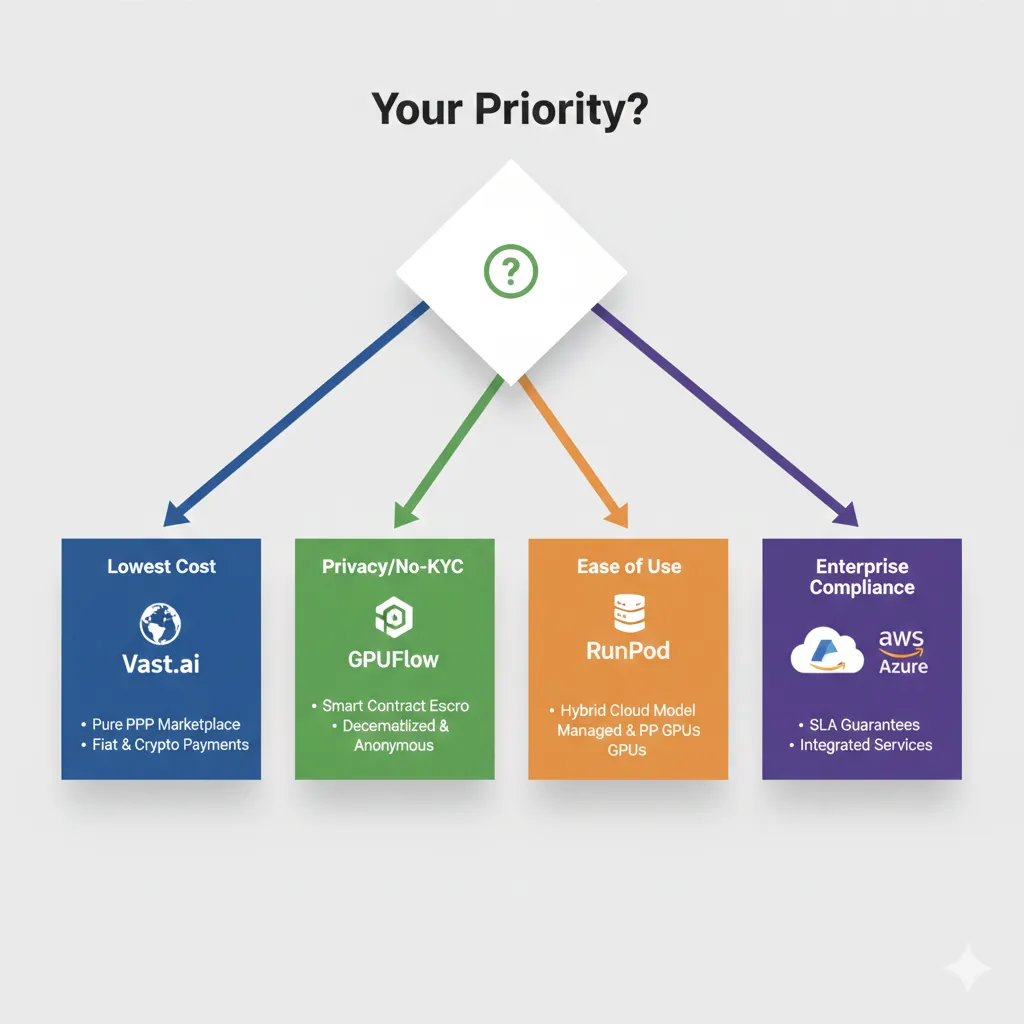
Choosing Your Platform
Start with GPUFlow if:
- You value privacy and want to avoid KYC
- You’re comfortable with cryptocurrency wallets and transactions
- You want lowest platform fees and instant access
- You’re willing to accept community-based reliability rather than enterprise SLAs
Choose Vast.ai if:
- Absolute lowest GPU pricing is your priority
- You need access to wide hardware selection including newest consumer GPUs
- You can evaluate individual provider reliability
- You’re comfortable with marketplace dynamics and variable availability
Select RunPod if:
- You want cryptocurrency payment option with managed service reliability
- Pre-configured templates would accelerate your workflow
- You prefer balance between cost and support
- You’re willing to accept moderate KYC for higher withdrawal limits
Consider traditional cloud providers if:
- Enterprise compliance requirements mandate SOC2, HIPAA, or similar certifications
- Your organization requires guaranteed uptime SLAs
- Integration with existing cloud infrastructure is essential
- Budget is secondary to reliability and support
Getting Started Recommendation
The lowest-risk entry point: Deposit $20-30 in USDC on Polygon network, rent an RTX 4090 on GPUFlow or Vast.ai for 2-3 hours, and complete a real workload. This provides direct experience with cryptocurrency GPU rental at minimal cost and time commitment.
Total out-of-pocket cost including all fees: approximately $25. This covers cryptocurrency acquisition, network fees, and 3 hours of GPU time sufficient to train a Stable Diffusion LoRA, fine-tune a small language model, or run substantial inference workloads.
The experience will clarify whether cryptocurrency payments suit your workflow and whether marketplace GPU rental meets your performance and reliability requirements. Then you can scale usage or explore different platforms from an informed position.
Additional Resources
Platform documentation:
- GPUFlow Documentation - Smart contract addresses, API reference, troubleshooting
- Vast.ai FAQ and Guides - Provider evaluation, instance configuration, best practices
- RunPod Documentation - Template creation, API access, billing details
Cryptocurrency fundamentals:
- MetaMask Support - Wallet setup, network configuration, security
- Polygon Documentation - Network details, faucets for test MATIC, bridge instructions
- Ethereum Gas Tracker - Current gas prices, network congestion
Machine learning on rented GPUs:
- Hugging Face Documentation - Model deployment, fine-tuning guides
- Stable Diffusion Training - LoRA training, full fine-tuning examples
- PyTorch Distributed Training - Multi-GPU setup on rental instances
Tax and compliance:
- CoinTracker - Cryptocurrency tax software with exchange integration
- Koinly - Alternative tax reporting tool supporting 20,000+ cryptocurrencies
- IRS Virtual Currency Guidance - Official US tax treatment
Community and support:
- GPUFlow Discord - Platform support, provider discussions, user community
- r/MachineLearning - ML techniques, GPU benchmarks, cost optimization
- r/CryptoCurrency - Cryptocurrency news, wallet recommendations, security discussions
Related Articles
From this site:
- GPU Rental Pricing Comparison 2026 - Comprehensive pricing analysis across all major providers
- How to Train Stable Diffusion LoRA Models for Under $10 - Practical guide to cost-effective image model training
- RunPod vs Vast.ai: Detailed Comparison - Head-to-head analysis of top marketplace platforms
External resources:
- A16z Crypto Startup School - Cryptocurrency and blockchain fundamentals
- Fast.ai Practical Deep Learning - ML training optimized for limited compute budgets
- Papers With Code - ML research with code implementations and compute requirements
Frequently Asked Questions
Can I rent a GPU with cryptocurrency?
Yes. Several GPU rental platforms accept cryptocurrency payments including GPUFlow (primary payment method), Vast.ai (through payment processors), and RunPod (via Coinbase Commerce). Payment options typically include Bitcoin, Ethereum, Solana, and stablecoins like USDC and USDT. GPUFlow operates entirely on blockchain-based payments with smart contract escrow, while other platforms offer cryptocurrency as an alternative to credit cards.
Do I need KYC verification to rent GPUs with crypto?
KYC requirements vary by platform. GPUFlow and Vast.ai do not require identity verification for basic GPU rental. You can connect a wallet and begin renting immediately. RunPod has optional KYC that may be required for certain withdrawal limits or features, but basic GPU rental typically does not require verification. Traditional cloud providers (AWS, Azure, GCP) require extensive account verification regardless of payment method.
Is renting GPUs with cryptocurrency more expensive?
No. Crypto-friendly GPU marketplaces often have lower fees than traditional alternatives. GPUFlow charges 10-15% platform fees compared to 20-30% on some competitors. You avoid 2.5-3.5% credit card processing fees, though you pay blockchain network transaction fees (typically $0.01-0.10 on Polygon). For international users, cryptocurrency eliminates currency conversion fees (1-3%) and international transaction fees, often resulting in net savings.
How does smart contract escrow work for GPU rentals?
Smart contract escrow locks your cryptocurrency payment in blockchain-based code that neither you nor the provider controls directly. When you start a rental, funds transfer to the contract address where they remain until rental completion. Upon successful completion, the contract automatically releases payment to the provider. If service fails to meet specifications, dispute mechanisms built into the contract determine fund distribution. This eliminates the need to trust platform operators with fund custody.
What cryptocurrencies can I use to rent GPUs?
Common accepted cryptocurrencies include Ethereum (ETH), Bitcoin (BTC), Solana (SOL), Polygon (MATIC), and stablecoins (USDC, USDT, DAI). GPUFlow primarily uses Polygon network for low transaction fees. Vast.ai accepts 15+ cryptocurrencies through CoinPayments integration. RunPod supports BTC, ETH, and USDC via Coinbase Commerce. Stablecoins are recommended for most users as they eliminate price volatility—your deposit maintains consistent USD value throughout the rental period.
Are cryptocurrency GPU rental transactions taxable?
Yes in most jurisdictions. Tax authorities in the US, UK, EU, and most developed countries treat cryptocurrency as property. Spending cryptocurrency on services like GPU rental is a taxable disposition that generates capital gains or losses. The difference between your cryptocurrency’s cost basis (what you paid for it) and its fair market value when spent is taxable. GPU rental costs may be deductible as business expenses if used for business purposes. Maintain detailed records including transaction hashes, dates, amounts, and USD values. Consult tax professionals for specific guidance.
Can I get refunds if rental fails or GPU doesn’t work?
Refund policies vary by platform. Smart contract platforms like GPUFlow include dispute mechanisms that allow fund recovery if service fails to meet specifications. Centralized platforms like RunPod and Vast.ai handle refunds through support tickets, typically resolving issues within 24-48 hours. Always test GPU functionality immediately after rental starts using nvidia-smi command. Report issues promptly—most platforms offer refunds or credits for verified hardware failures. Keep blockchain transaction records and screenshots as evidence for disputes.
Is it safe to use GPU rental platforms that don’t require KYC?
No-KYC platforms are safe for GPU rental purposes but require understanding the tradeoffs. Your rental activity and computational work are as secure as on traditional platforms. The risk involves platform longevity and dispute resolution—platforms without regulatory compliance may face shutdown or legal challenges. For GPU rental specifically (as opposed to storing large cryptocurrency balances), the risk is minimal as funds are escrowed only during active rental periods. Use established platforms with track records and community reputation. Never store more cryptocurrency on platforms than you need for immediate rentals.
What happens if cryptocurrency price drops during my rental?
If you deposited cryptocurrency directly (ETH, SOL, MATIC), price drops affect your remaining balance but not the active rental cost. Rental cost is calculated based on cryptocurrency amount committed at rental start. For example, if you escrowed 1 ETH when ETH = $3000, your rental proceeds based on that 1 ETH regardless of price changes. However, unused balance may be worth less if converted back to fiat. This is why stablecoins (USDC, USDT) are recommended—they maintain USD parity eliminating volatility risk.
Can businesses and enterprises use cryptocurrency GPU rental?
Yes. Cryptocurrency GPU rental is increasingly viable for enterprise use. Companies holding cryptocurrency as treasury assets can spend it directly for computing resources without converting to fiat. This simplifies accounting for international operations and eliminates currency conversion fees. However, enterprises must consider compliance requirements—some regulated industries require vendors to meet specific certifications that marketplace platforms lack. Enterprise adoption is growing but currently represents minority of cryptocurrency GPU rental volume.
Ready to rent your first GPU with cryptocurrency? GPUFlow offers instant access with smart contract escrow, competitive marketplace pricing, and no KYC requirements. Connect your wallet and start computing in under 60 seconds.