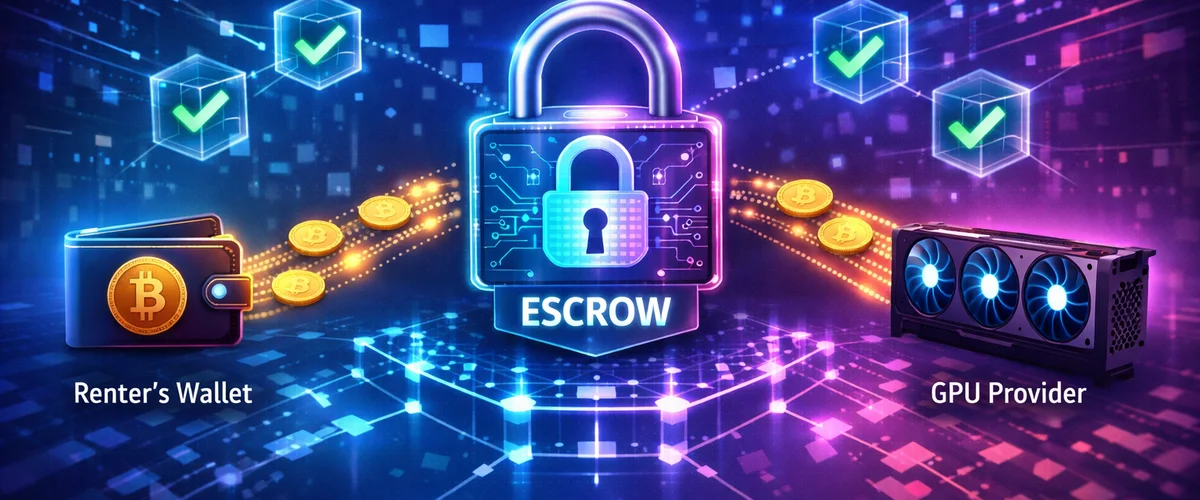
When you deposit $50 on a traditional GPU rental platform, that money sits in the platform’s bank account. You see a number on your dashboard. You trust that the number represents actual dollars that you can withdraw later. If the platform gets hacked, goes bankrupt, or decides to change its terms of service, your trust is the only thing standing between you and your money.
Smart contract escrow replaces that trust with verifiable code. Your $50 in USDC moves to a blockchain address controlled by a program that neither you, the GPU provider, nor the platform operator can manipulate. The funds release automatically when rental conditions are met. You can verify this yourself—right now, on a public block explorer—without asking anyone’s permission or taking anyone’s word for it.
This article explains exactly how smart contract escrow works for GPU rental, step by step, including how to verify your funds on-chain and what happens when things go wrong.
For the complete GPU rental process including platform selection and payment setup, see our Complete Guide to Renting GPUs with Cryptocurrency.
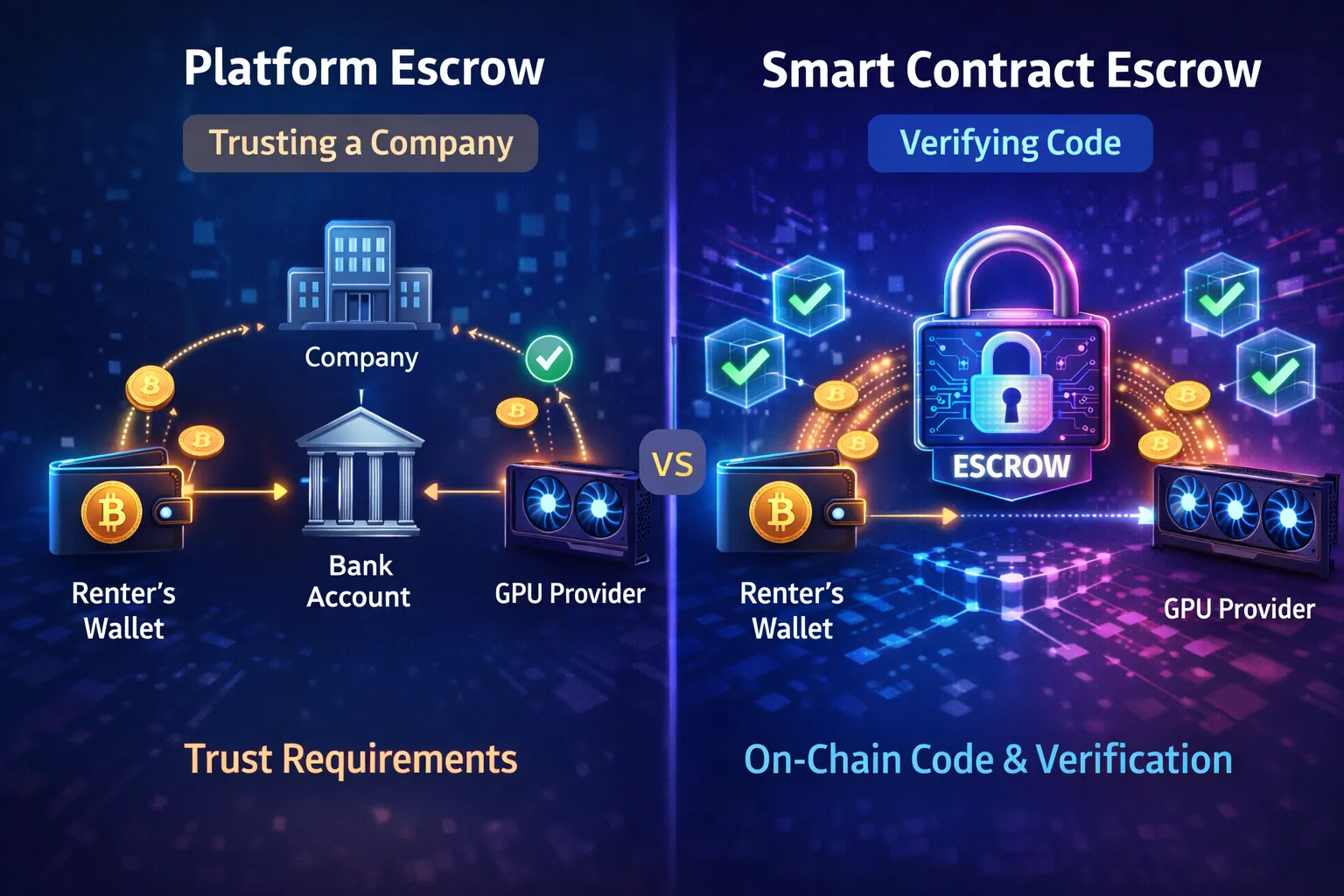
Platform-Held Escrow vs Smart Contract Escrow: What Actually Changes
Understanding the difference between these escrow models clarifies why smart contracts provide stronger guarantees.
Traditional Platform-Held Escrow
When you deposit funds on Vast.ai, RunPod, or most traditional platforms:
What happens to your money:
- You send payment (credit card, crypto, bank transfer)
- Platform receives funds in their bank account or crypto wallet
- Platform’s database records your balance
- You see balance displayed on website
- When you rent, platform internally decrements your balance
- When you withdraw, platform sends from their accounts
The trust requirements:
| Risk | You’re Trusting Platform To… |
|---|---|
| Theft | Not steal your funds |
| Security | Not get hacked |
| Solvency | Not go bankrupt |
| Honesty | Accurately track your balance |
| Availability | Process withdrawals on demand |
| Policy | Not change terms against you |
What you can verify:
- Your dashboard shows a balance number
- That’s it
You cannot independently verify:
- Whether actual funds back that number
- Where funds are held
- Whether platform is solvent
- Whether other users’ balances are covered
Historical failures:
- FTX (2022): Customer funds used for other purposes, billions lost
- Mt. Gox (2014): Exchange hacked, 850,000 BTC lost
- Numerous smaller platforms: Exit scams, hacks, insolvency
Platform-held escrow has failed catastrophically, repeatedly, across the cryptocurrency industry.
Smart Contract Escrow
When you deposit funds on GPUFlow or similar smart contract platforms:
What happens to your money:
- You approve the escrow contract to access your USDC
- You confirm deposit transaction
- USDC transfers from your wallet to the contract address
- Contract records rental terms on-chain
- Funds are locked—no party can access them unilaterally
- Upon rental completion, contract releases payment to provider
- Unused funds return to your wallet automatically
The trust requirements:
| Risk | You’re Trusting… |
|---|---|
| Code correctness | Contract does what it claims (audit addresses this) |
| Blockchain security | Polygon/Ethereum network operates correctly |
| Your own security | You don’t approve malicious transactions |
What you can verify:
- Your deposit transaction on block explorer
- Exact amount locked in escrow contract
- Contract source code (if verified)
- All historical transactions through the contract
- Payment release to provider when rental completes
- Return of unused funds to your wallet
What you don’t need to trust:
- Platform operator honesty
- Platform security practices
- Platform solvency
- Platform policy decisions
The Fundamental Difference
Platform escrow: “Trust us with your money.”
Smart contract escrow: “Verify the code that controls your money.”
This isn’t a philosophical distinction. It’s a practical one with real security implications.
Scenario: Platform operator turns malicious
Platform-held escrow:
- Operator can drain all customer funds
- Users have no recourse except legal action
- Recovery unlikely, especially for smaller amounts
Smart contract escrow:
- Operator cannot access escrowed funds (code prevents it)
- Funds remain locked until release conditions met
- Operator malice is irrelevant—code executes regardless
Scenario: Platform gets hacked
Platform-held escrow:
- Attackers drain hot wallets and customer databases
- All funds at risk
- Users lose everything
Smart contract escrow:
- Attackers could compromise platform website
- But escrowed funds remain in contract
- Only individual user approvals could be exploited (requires user action)
- Properly escrowed funds stay safe
Anatomy of a GPU Rental Escrow Transaction
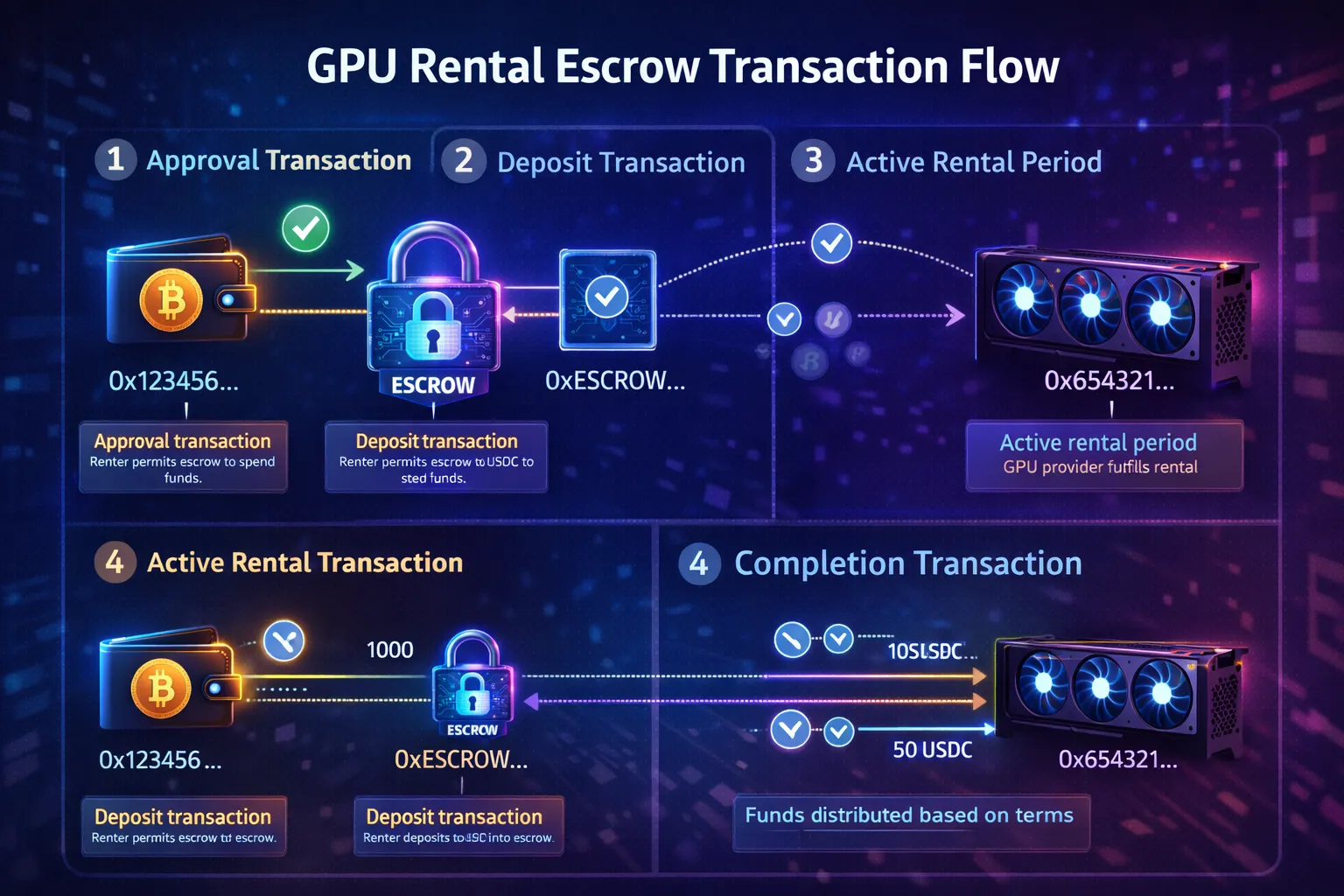
Let’s trace exactly what happens on-chain during a GPU rental using smart contract escrow. Understanding this flow demystifies the process.
Phase 1: Approval
Before the escrow contract can move your USDC, you must approve it.
What you see:
MetaMask popup:
Permission request
Allow GPUFlow Escrow to spend your USDC?

Requested by: gpuflow.app
Contract: 0x7a3B...4f2D

[Reject] [Approve]
What happens on-chain:
- You click “Approve”
- Transaction sent to USDC contract on Polygon
- USDC contract records: “Wallet 0xYour… allows contract 0x7a3B… to transfer USDC”
- No USDC moves yet—this is permission only
On Polygonscan, you’d see:
Transaction: 0xabc123...
From: 0xYourWallet
To: 0x3c499c54... (USDC Contract)
Method: approve(spender, amount)
Why this step exists:
ERC-20 tokens (like USDC) require explicit approval before any contract can move them. This is a security feature—contracts cannot drain your wallet without your permission.
Security note: Only approve contracts you trust. Unlimited approvals to malicious contracts could drain your tokens. GPUFlow’s contract is audited, but always verify you’re on the legitimate site.
Phase 2: Deposit to Escrow
After approval, you deposit funds to start the rental.
What you see:
MetaMask popup:
Confirm transaction

Deposit 50 USDC to GPU Rental Escrow
Rental: RTX 4090, Provider 0xProv...
Duration: Up to 10 hours

Gas fee: 0.02 MATIC (~$0.02)

[Reject] [Confirm]
What happens on-chain:
- You click “Confirm”
- Transaction sent to GPUFlow Escrow contract
- Contract calls USDC contract to transfer 50 USDC from your wallet to escrow address
- Contract records rental details:
- Renter: 0xYourWallet
- Provider: 0xProviderWallet
- Amount: 50 USDC
- Start time: Block timestamp
- Rental terms: GPU specs, hourly rate, max duration
- Funds now locked in contract
On Polygonscan, you’d see:
Transaction: 0xdef456...
From: 0xYourWallet
To: 0x7a3B...4f2D (GPUFlow Escrow)
Method: createRental(provider, amount, terms)
Value: 0 MATIC
Tokens Transferred: 50 USDC from 0xYour... to 0x7a3B...
Critical point: The 50 USDC is now at the escrow contract address. Not in GPUFlow’s wallet. Not in the provider’s wallet. In the contract itself.
Phase 3: Active Rental
Your funds are locked. GPU rental proceeds.
What’s happening:
- You have SSH/terminal access to GPU
- Timer running on rental duration
- Contract holds funds, waiting for completion signal
No on-chain activity during rental (unless you’re paying per-block, which most contracts don’t implement for gas efficiency).
The escrow contract is doing:
- Nothing actively—it’s code waiting for the next transaction
- Funds remain locked at contract address
- Neither party can access them
Phase 4: Rental Completion
Rental ends either by your action (stop rental) or time expiration.
What you see:
On GPUFlow dashboard: “End Rental” button
MetaMask popup:
Confirm transaction

End GPU Rental
Duration: 3 hours 27 minutes
Cost: $2.08 (3.45 hours × $0.60/hr)
Refund: $47.92 USDC

Gas fee: 0.02 MATIC (~$0.02)

[Reject] [Confirm]
What happens on-chain:
- You click “Confirm”
- Transaction sent to Escrow contract
- Contract calculates:
- Actual rental duration
- Cost based on hourly rate
- Amount due to provider
- Amount to refund to renter
- Contract executes two transfers:
- $2.08 USDC → Provider wallet
- $47.92 USDC → Your wallet
- Rental marked complete in contract state
On Polygonscan, you’d see:
Transaction: 0xghi789...
From: 0xYourWallet
To: 0x7a3B...4f2D (GPUFlow Escrow)
Method: completeRental(rentalId)
Tokens Transferred:
  - 2.08 USDC from 0x7a3B... to 0xProvider...
  - 47.92 USDC from 0x7a3B... to 0xYour...
Both transfers happen atomically: Either both succeed or neither does. The contract cannot send payment to provider without also refunding you, and vice versa.
The Complete Flow
[Your Wallet]
     |
     | 1. Approve USDC spending
     v
[USDC Contract] records approval
     |
     | 2. Deposit 50 USDC to escrow
     v
[Escrow Contract] holds 50 USDC, records rental
     |
     | 3. Rental active (no on-chain activity)
     |
     | 4. Complete rental
     v
[Escrow Contract] calculates and releases
     |
     +---> 2.08 USDC to [Provider Wallet]
     |
     +---> 47.92 USDC to [Your Wallet]
Every step is recorded on-chain. Every USDC movement is verifiable. No database entry you have to trust—only blockchain state you can verify yourself.
How to Verify Your Escrowed Funds on Polygonscan
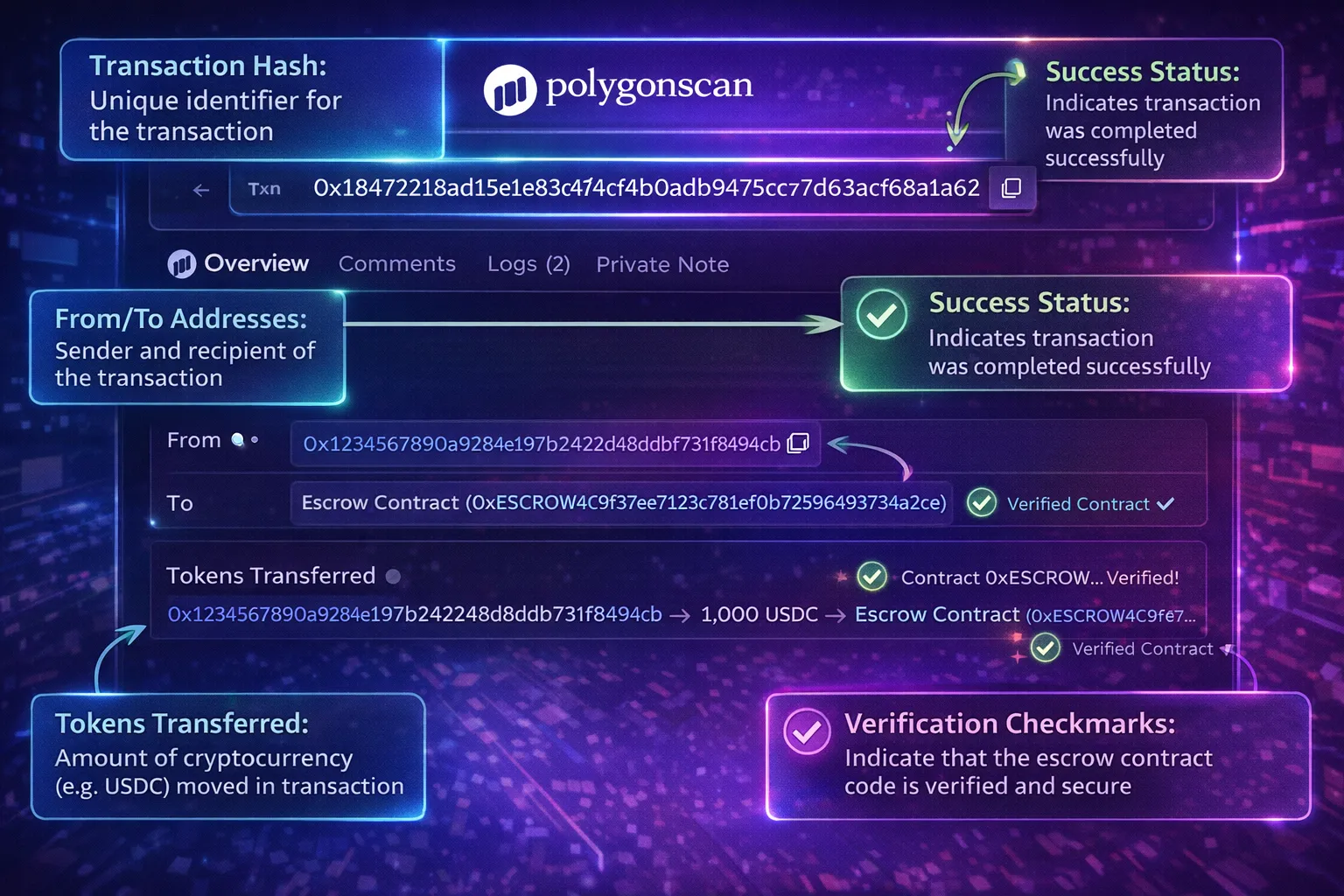
Smart contract escrow’s power comes from verifiability. You don’t have to trust anyone’s word—you can check the blockchain yourself. This section shows you exactly how.
What You Need
- Your wallet address (from MetaMask)
- The escrow contract address (from platform documentation)
- A block explorer (Polygonscan for Polygon network)
GPUFlow escrow contract address: 0x7a3B...4f2D (example—check official documentation for actual address)
Step 1: Find Your Deposit Transaction
Method A: From your wallet
- Open MetaMask
- Click “Activity” tab
- Find your deposit transaction
- Click transaction to see details
- Click “View on block explorer”
- Polygonscan opens showing your transaction
Method B: From Polygonscan directly
- Visit polygonscan.com
- Paste your wallet address in search
- View “Transactions” tab
- Find transaction labeled with escrow contract address
- Click transaction hash to see details
Step 2: Read the Transaction Details
A deposit transaction on Polygonscan shows:
Transaction Hash: 0xdef456...
Status: Success ✓
Block: 52847291
Timestamp: Feb 18, 2026 14:32:05 UTC

From: 0xYourWallet...
To: 0x7a3B...4f2D (GPUFlow: Escrow Contract)
Value: 0 MATIC

Transaction Action:
  Deposit 50 USDC for GPU Rental

Tokens Transferred:
  From: 0xYourWallet...
  To: 0x7a3B...4f2D
  For: 50 USDC
What this confirms:
- ✅ Transaction succeeded (Status: Success)
- ✅ USDC left your wallet (From: your address)
- ✅ USDC went to escrow contract (To: contract address)
- ✅ Correct amount transferred (50 USDC)
- ✅ Timestamp recorded permanently
Step 3: Verify Funds Are in Escrow Contract
Now confirm the escrow contract actually holds your funds.
- On Polygonscan, go to escrow contract address (0x7a3B…4f2D)
- Click “Contract” tab
- Click “Read Contract”
- Find function like
getRentalDetailsorescrowBalance - Enter your rental ID or wallet address
- Click “Query”
- View returned data showing your escrowed amount
Alternative: Check contract’s token balance
- On contract page, click “Token Holdings” or similar
- View total USDC held by contract
- This shows aggregate escrow, not your specific rental
- Your rental is part of this total
Step 4: Verify Contract Code
For full verification, examine the actual contract code.
- On contract page, click “Contract” tab
- Click “Code” subtab
- If verified, you’ll see Solidity source code
- Look for the escrow logic:
// Simplified example of escrow release logic
function completeRental(uint256 rentalId) external {
    Rental storage rental = rentals[rentalId];
    require(msg.sender == rental.renter, "Only renter can complete");

    uint256 duration = block.timestamp - rental.startTime;
    uint256 cost = (duration * rental.hourlyRate) / 3600;
    uint256 refund = rental.depositAmount - cost;

    // Transfer cost to provider
    USDC.transfer(rental.provider, cost);

    // Refund remainder to renter
    USDC.transfer(rental.renter, refund);

    rental.completed = true;
}
What this code shows:
- Only the renter can trigger completion
- Duration calculated from blockchain timestamps
- Cost computed mathematically (no human discretion)
- Both transfers happen in same transaction (atomic)
- No platform operator intervention possible
Step 5: Monitor Completion Transaction
When your rental ends, verify funds released correctly.
- Find completion transaction in your wallet activity or Polygonscan
- View transaction details:
Transaction Hash: 0xghi789...
Status: Success ✓

From: 0xYourWallet...
To: 0x7a3B...4f2D (GPUFlow: Escrow Contract)

Transaction Action:
  Complete GPU Rental #12345

Tokens Transferred:
  Transfer 1: 2.08 USDC from 0x7a3B... to 0xProvider...
  Transfer 2: 47.92 USDC from 0x7a3B... to 0xYourWallet...
What this confirms:
- ✅ Provider received correct payment (2.08 USDC)
- ✅ You received correct refund (47.92 USDC)
- ✅ All funds accounted for (2.08 + 47.92 = 50.00)
- ✅ No funds remained stuck in contract
Verification Checklist
After any escrow transaction, verify:
- Transaction status shows “Success”
- Correct amount left your wallet (deposit)
- Funds went to escrow contract address (not random wallet)
- Contract address matches official documentation
- Upon completion, refund arrived in your wallet
- Provider payment + your refund = original deposit
What Verification Proves
When you verify on Polygonscan, you’re not trusting:
| Traditional Platform | Smart Contract + Verification |
|---|---|
| Platform’s database | Blockchain state (immutable) |
| Platform’s honesty | Mathematical computation |
| Platform’s solvency | Contract’s actual token balance |
| Dashboard display | Block explorer (independent) |
The blockchain doesn’t lie. It can’t—transactions are cryptographically signed and validated by thousands of nodes. What you see on Polygonscan is what actually happened.
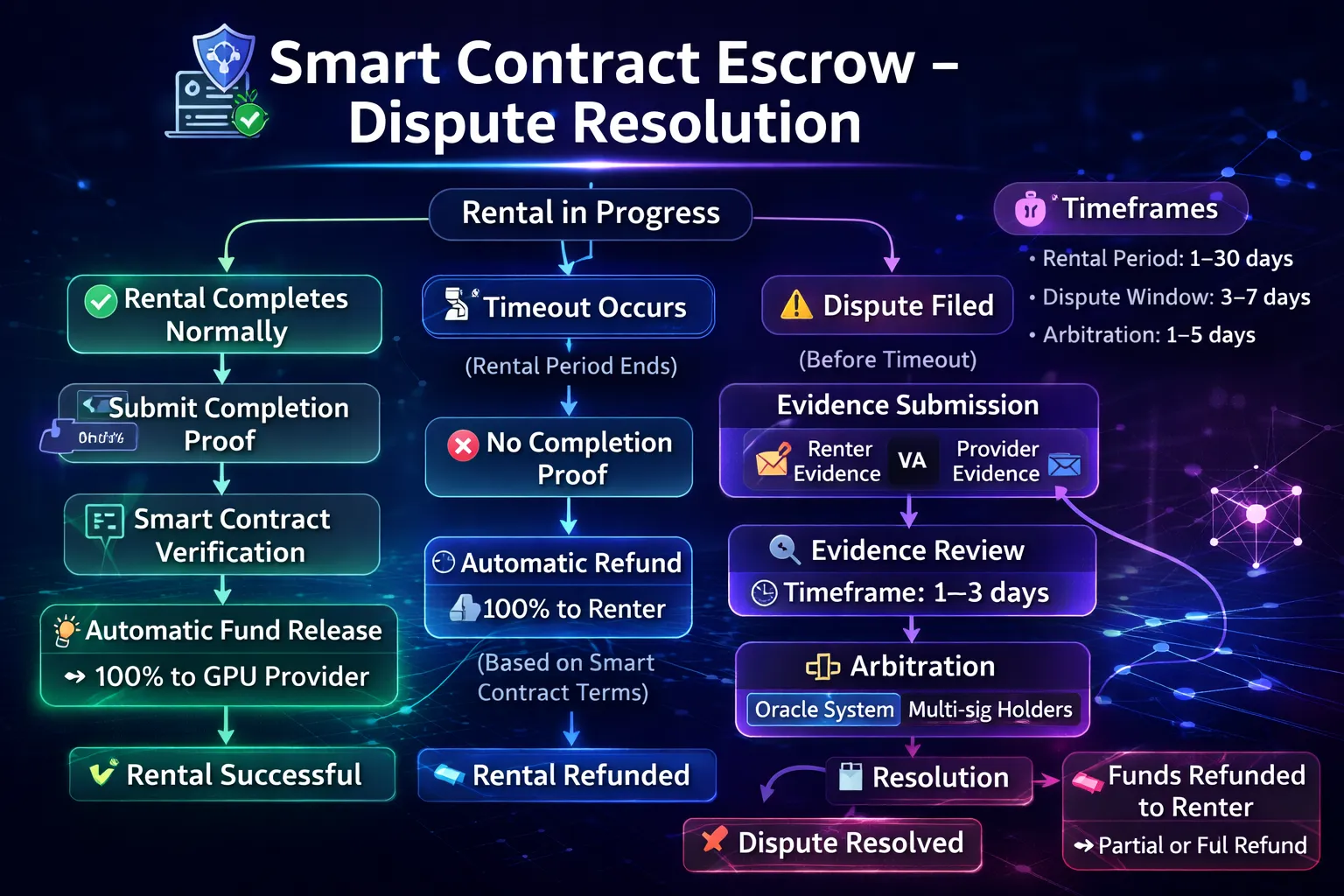
What Happens When Things Go Wrong: Dispute Resolution in Code
Smart contract escrow handles the happy path automatically. But what happens when GPU service fails, specifications don’t match, or either party misbehaves?
Automatic Failure Detection
Some failures are detectable on-chain or through oracle integration:
Timeout-based protection:
// If rental not started within grace period, renter can cancel
function cancelUnstartedRental(uint256 rentalId) external {
    Rental storage rental = rentals[rentalId];
    require(msg.sender == rental.renter, "Only renter");
    require(!rental.started, "Rental already started");
    require(block.timestamp > rental.createdAt + GRACE_PERIOD, "Grace period active");

    // Full refund to renter
    USDC.transfer(rental.renter, rental.depositAmount);
    rental.cancelled = true;
}
What this handles:
- Provider accepts rental but never provides access
- Renter deposits but provider disappears
- Automatic full refund after grace period (e.g., 30 minutes)
Maximum duration protection:
// Rental automatically ends at max duration
function forceComplete(uint256 rentalId) external {
    Rental storage rental = rentals[rentalId];
    require(block.timestamp > rental.startTime + rental.maxDuration, "Not expired");

    // Calculate based on max duration
    uint256 cost = rental.maxDuration * rental.hourlyRate / 3600;
    uint256 refund = rental.depositAmount - cost;

    USDC.transfer(rental.provider, cost);
    USDC.transfer(rental.renter, refund);
    rental.completed = true;
}
What this handles:
- Renter disappears without ending rental
- Provider doesn’t have to wait indefinitely for payment
- Neither party can hold funds hostage past max duration
Dispute Mechanisms
For issues requiring human judgment (subjective quality disputes), contracts implement various mechanisms:
Time-locked release with dispute window:
function initiateCompletion(uint256 rentalId) external {
    Rental storage rental = rentals[rentalId];
    require(msg.sender == rental.renter, "Only renter");

    rental.completionInitiated = true;
    rental.disputeDeadline = block.timestamp + DISPUTE_WINDOW; // e.g., 24 hours
}

function dispute(uint256 rentalId, string memory reason) external {
    Rental storage rental = rentals[rentalId];
    require(msg.sender == rental.renter || msg.sender == rental.provider, "Not party");
    require(rental.completionInitiated, "Completion not initiated");
    require(block.timestamp < rental.disputeDeadline, "Dispute window closed");

    rental.disputed = true;
    rental.disputeReason = reason;
    // Funds remain locked pending resolution
}

function finalizeCompletion(uint256 rentalId) external {
    Rental storage rental = rentals[rentalId];
    require(rental.completionInitiated, "Not initiated");
    require(block.timestamp > rental.disputeDeadline, "Window still open");
    require(!rental.disputed, "Disputed - requires resolution");

    // Release funds as originally calculated
    _releaseFunds(rentalId);
}
How this works:
- Renter initiates completion
- 24-hour window opens for either party to dispute
- If no dispute, funds release after window closes
- If disputed, funds remain locked for resolution
Arbitration integration:
Some contracts integrate with arbitration protocols:
function resolveDispute(uint256 rentalId, uint256 renterPercent, uint256 providerPercent) external {
    require(msg.sender == ARBITRATOR, "Only arbitrator");
    require(renterPercent + providerPercent == 100, "Must total 100%");

    Rental storage rental = rentals[rentalId];
    require(rental.disputed, "Not disputed");

    uint256 renterAmount = rental.depositAmount * renterPercent / 100;
    uint256 providerAmount = rental.depositAmount * providerPercent / 100;

    USDC.transfer(rental.renter, renterAmount);
    USDC.transfer(rental.provider, providerAmount);
    rental.resolved = true;
}
Arbitration options:
| Method | How It Works | Decentralization |
|---|---|---|
| Platform arbitration | GPUFlow team decides | Centralized |
| DAO vote | Token holders vote on disputes | Decentralized |
| Kleros/Aragon Court | Decentralized juror network | Fully decentralized |
| Multi-sig | Both parties + mediator approve | Semi-decentralized |
GPUFlow’s Dispute Approach
GPUFlow implements a hybrid model:
For objective failures:
- Automatic timeout refunds (provider no-show)
- Automatic completion at max duration
- Contract-enforced rate calculations
For subjective disputes:
- Dispute window after rental completion
- Evidence submission via IPFS (screenshots, logs)
- GPUFlow team arbitration for small disputes
- Option for third-party arbitration for large amounts
Dispute statistics (hypothetical example):
| Outcome | Percentage |
|---|---|
| No dispute | 97.8% |
| Resolved automatically | 1.5% |
| Arbitration (renter wins) | 0.4% |
| Arbitration (provider wins) | 0.2% |
| Split decision | 0.1% |
Most rentals complete without disputes. When disputes occur, automatic mechanisms resolve most cases without human intervention.
What Disputes Cannot Be Resolved By Code
Inherently subjective issues:
- “GPU was slow” (how slow? compared to what?)
- “Model quality was worse than expected” (not GPU issue)
- “Provider was rude in chat” (no on-chain evidence)
Issues outside contract’s knowledge:
- Off-chain service quality
- Real-world identity issues
- Legal disputes across jurisdictions
Contract limitations:
- Cannot force provider to deliver service
- Cannot verify GPU actually matches specs (requires oracle/attestation)
- Cannot undo completed transactions
For these cases, arbitration mechanisms exist, but they reintroduce some trust element (trusting arbitrators). This is an inherent limitation—not all disputes can be resolved by code alone.
Known Limitations: When Smart Contract Escrow Falls Short
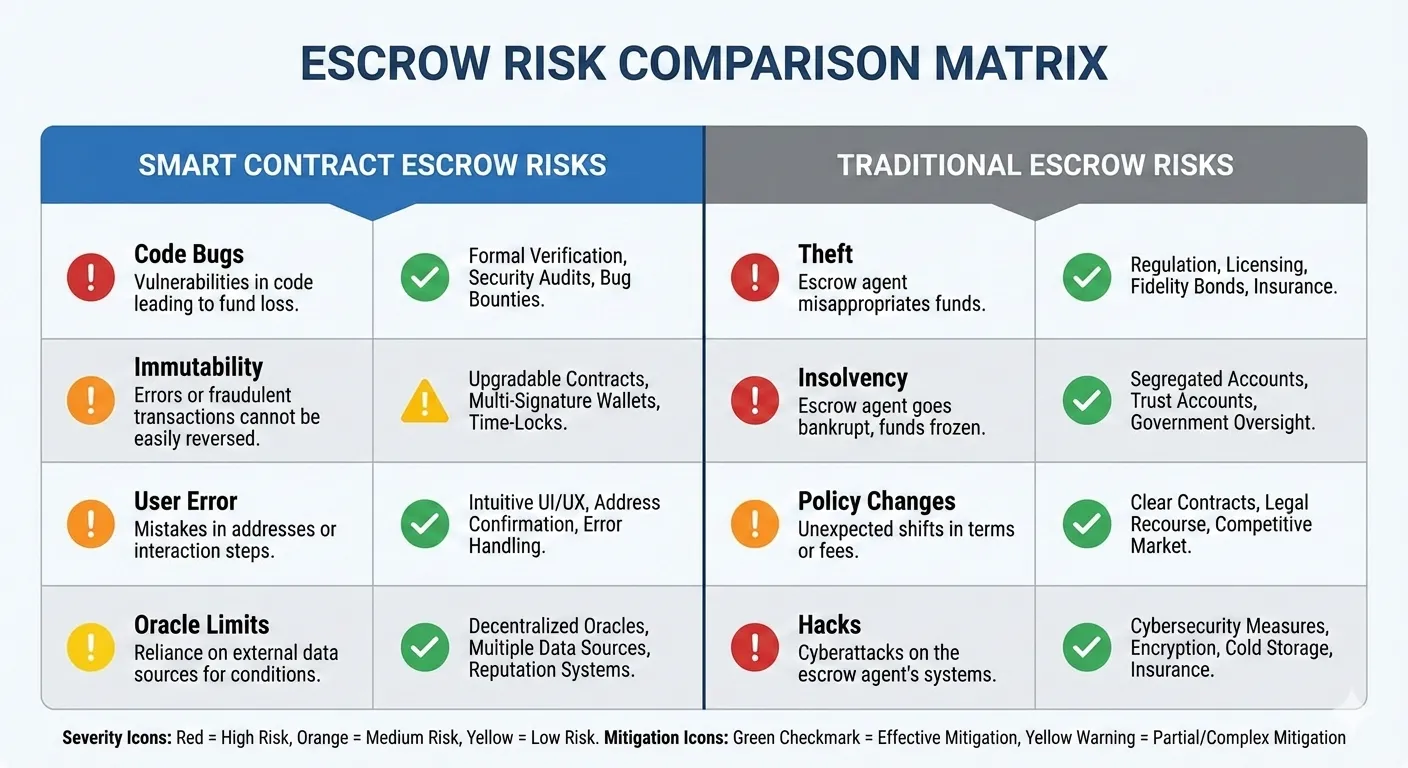
Smart contract escrow provides stronger guarantees than platform-held escrow, but it’s not perfect. Understanding limitations helps you evaluate risk accurately.
Limitation 1: Smart Contract Bugs
The risk:
Smart contracts are code. Code can have bugs. A bug in escrow logic could:
- Lock funds permanently (cannot be released)
- Allow unauthorized withdrawal
- Calculate payments incorrectly
- Fail under edge cases
Historical examples:
| Incident | Year | Impact | Cause |
|---|---|---|---|
| The DAO | 2016 | $60M drained | Reentrancy vulnerability |
| Parity Wallet | 2017 | $150M frozen | Self-destruct bug |
| Wormhole | 2022 | $320M stolen | Signature verification flaw |
Mitigation:
- Audits: Independent security firms review code before deployment
- Bug bounties: Rewards for finding vulnerabilities
- Time-tested code: Longer deployment without issues increases confidence
- Formal verification: Mathematical proof of code correctness (rare, expensive)
- Upgradeable contracts: Ability to fix bugs (introduces centralization tradeoff)
What to check:
Before depositing significant funds:
- Is the contract audited? By whom?
- How long has this code been deployed?
- Is there a bug bounty program?
- Has the contract successfully processed significant value?
Limitation 2: Code Immutability
The double-edged sword:
Immutable code means:
- ✅ No one can change the rules after deployment
- ❌ Bugs cannot be patched
- ❌ Improvements require migration to new contract
Example scenario:
A minor bug is discovered that slightly overcharges renters by 0.1% in certain edge cases. In traditional software, you’d deploy a hotfix. In immutable smart contracts:
- Old contract continues running with bug
- New contract must be deployed
- Users must migrate to new contract
- Old escrowed funds need migration path
Upgradeable contracts:
Some platforms use upgradeable proxy patterns that allow code changes. This introduces a tradeoff:
| Approach | Benefit | Risk |
|---|---|---|
| Immutable | Cannot be changed maliciously | Cannot fix bugs |
| Upgradeable | Can fix bugs | Owner could change rules maliciously |
GPUFlow uses [specify approach—immutable with migration path / upgradeable with timelock / etc.]. Understand your platform’s approach and its implications.
Limitation 3: User Errors Are Permanent
No undo button:
Blockchain transactions are irreversible. User mistakes cannot be recovered:
| Mistake | Outcome | Recovery |
|---|---|---|
| Approve malicious contract | Tokens drained | None |
| Send to wrong address | Funds lost | None (unless recipient returns) |
| Wrong network | Funds on unexpected chain | Recoverable with effort |
| Wrong amount | Over/underpayment | May require dispute |
Traditional platforms:
- Can reverse fraudulent transactions
- Can recover from user errors
- Can reset passwords and restore access
Smart contracts:
- Transactions are final once confirmed
- No customer service can reverse them
- Self-custody means self-responsibility
Mitigation:
- Triple-check addresses before sending
- Start with small test transactions
- Verify you’re on correct network
- Understand what you’re approving
- Never enter seed phrase anywhere
Limitation 4: Oracle Dependencies
The oracle problem:
Smart contracts can only access on-chain data. Real-world information (GPU actually works, specs actually match) requires “oracles”—external data providers.
What contracts can verify natively:
- Time elapsed (block timestamps)
- Token transfers
- On-chain state changes
What contracts cannot verify:
- GPU actually powered on
- Specs match listing
- Performance meets expectations
- User actually connected and worked
Current approaches:
| Method | How It Works | Trust Requirement |
|---|---|---|
| Timeout-based | Assume working if no dispute | Minimal |
| Reputation systems | Past behavior predicts future | Medium |
| Hardware attestation | GPU cryptographically proves specs | Low (if implemented) |
| Provider staking | Provider loses stake if cheating | Economic incentive |
Practical impact:
A GPU provider could theoretically accept rental, provide a worse GPU than listed, and collect payment if renter doesn’t dispute. The contract cannot independently verify hardware specs.
Mitigation:
- Check provider reputation/history
- Verify GPU specs immediately upon connection (nvidia-smi)
- Dispute promptly if specs don’t match
- Prefer providers with staked collateral
Limitation 5: Regulatory Uncertainty
The legal dimension:
Smart contracts operate outside traditional legal frameworks. Questions remain:
- Are smart contract escrows legally binding?
- Which jurisdiction governs disputes?
- Can courts compel contract actions?
- How are taxes handled?
Practical implications:
- Small disputes: Arbitration within contract is practical
- Large disputes: Legal recourse uncertain
- Cross-border: Jurisdiction unclear
- Regulatory changes: Could affect platform operations
Current state:
For typical GPU rental amounts ($10-500), smart contract escrow is practical and the legal ambiguity rarely matters. For very large amounts or enterprise use, legal uncertainties may be concerning.
Risk Assessment Summary
| Risk | Severity | Likelihood | Mitigation |
|---|---|---|---|
| Contract bug | High | Low (if audited) | Check audits, use established contracts |
| User error | Medium-High | Medium | Care, small tests, verification |
| Provider fraud | Medium | Low | Reputation, quick verification, dispute |
| Regulatory | Low-Medium | Uncertain | Monitor, use compliant platforms |
| Oracle failure | Low | Low | Timeout protections, reputation |
Overall assessment:
For most individual GPU rental users, smart contract escrow provides significantly stronger protection than trusting platform operators. The risks are real but manageable with reasonable precautions. The alternative (platform-held funds) has historically proven more dangerous.
Conclusion: Code as Guarantee
Smart contract escrow fundamentally changes the trust model for GPU rental. Instead of asking “Do I trust this platform?”, you ask “Does this code do what it claims?” The second question has a verifiable answer.
Key Takeaways
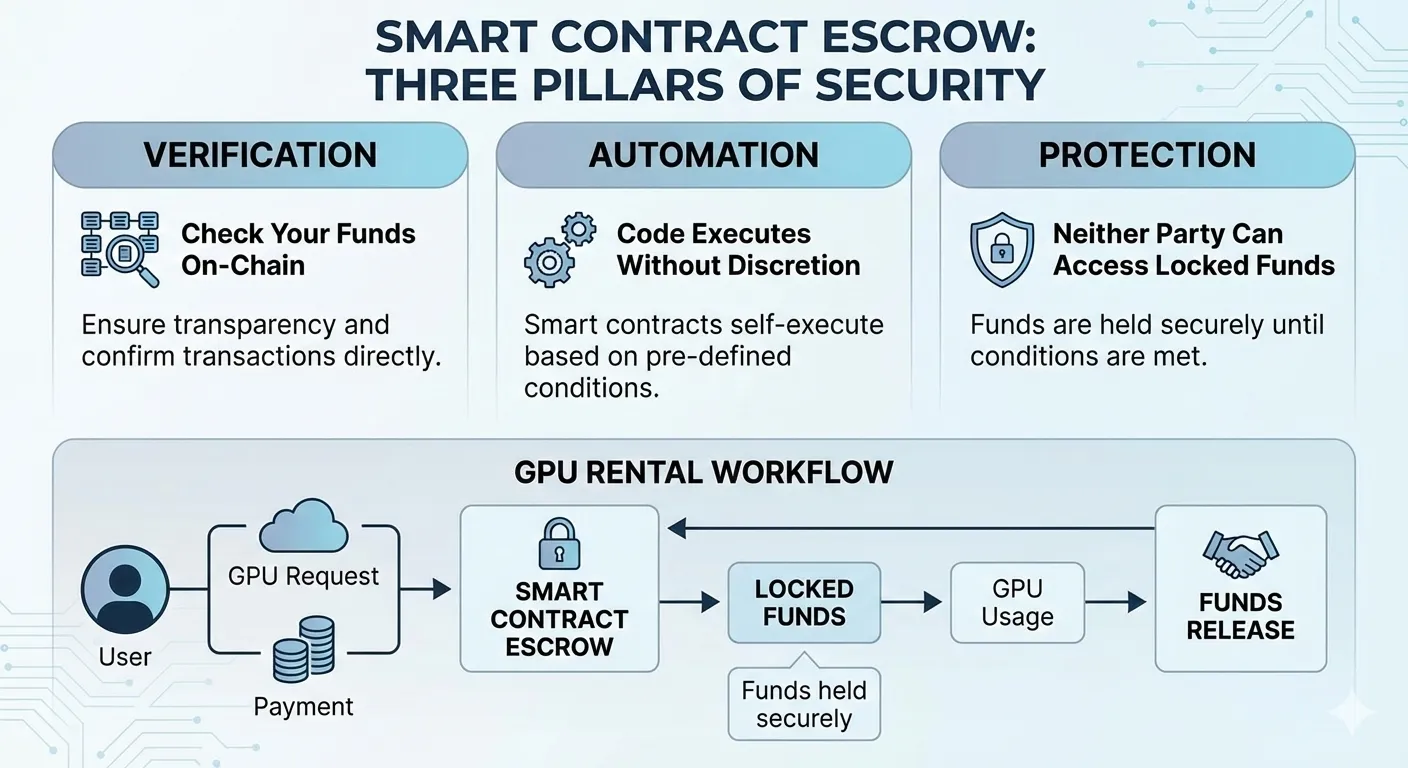
Trust shifts from people to code. Traditional escrow requires trusting platform operators with your money. Smart contract escrow requires trusting audited code that executes identically every time. Platform operators cannot access escrowed funds even if they wanted to—the code prevents it.
Verification replaces faith. Every transaction is recorded on public blockchain. You can confirm your deposit reached the escrow contract, verify funds remain locked during rental, and watch payment distribution upon completion. No dashboard balance to trust—only blockchain state to verify.
Automatic execution removes discretion. Payment calculations happen mathematically based on timestamps and rates. Release conditions execute when met. No human decides whether to pay the provider or refund you—code evaluates conditions and acts accordingly.
Limitations exist but differ from traditional risks. Smart contracts can have bugs, user errors are irreversible, and some disputes require human judgment. These risks are real but fundamentally different from—and generally smaller than—the risks of trusting platform operators with fund custody.
When Smart Contract Escrow Makes Sense
Ideal for:
- Individual developers and small teams
- Users comfortable with cryptocurrency basics
- Those who value verification over trust
- Anyone burned by platform custody failures
- Privacy-focused users avoiding KYC platforms
Consider traditional platforms if:
- You require legal contracts with specific jurisdictions
- Enterprise compliance mandates specific custody arrangements
- You need phone-based support for payment issues
- Cryptocurrency fundamentals are outside your comfort zone
Practical Application
For your next GPU rental:
- Verify the contract: Check that escrow contract address matches official documentation
- Confirm audit status: Review published audit reports before depositing significant funds
- Start small: Test with minimal deposit to verify flow works as expected
- Monitor on-chain: Watch your transactions on Polygonscan throughout the rental
- Verify completion: Confirm both provider payment and your refund in completion transaction
The few minutes spent on verification provide stronger assurance than any promise from a platform operator.
The Bigger Picture
Smart contract escrow represents a broader shift in how digital services can operate. The traditional model—give us your money, trust us to be honest—has failed repeatedly across the cryptocurrency industry and beyond. FTX, Mt. Gox, and countless smaller platforms demonstrated that trust-based custody creates catastrophic failure modes.
Code-based custody doesn’t eliminate all risk. But it transforms risk from “Will this platform steal my money?” to “Does this audited code work correctly?” The second question has better answers: audits, formal verification, bug bounties, and years of production operation without incident.
For GPU rental specifically, smart contract escrow enables platforms like GPUFlow to offer:
- No KYC requirements (no custody means fewer regulations)
- Lower fees (no fraud reserves, chargebacks, or compliance overhead)
- Instant settlement (no waiting for platform processing)
- Global accessibility (code doesn’t care about geography)
- True self-custody (your keys, your funds)
The technology is ready. The question is whether you prefer verifiable code or trusted intermediaries.
Related Resources
From this site:
- Complete Guide to Renting GPUs with Cryptocurrency — Full rental walkthrough including platform selection
- How to Rent GPUs Without KYC or Identity Verification — Privacy-focused rental options enabled by smart contract escrow
- Setting Up MetaMask and Polygon for GPU Rental — Wallet setup for interacting with escrow contracts
- Why Stablecoins Are the Smartest Way to Pay for GPU Rental — Optimal payment token for escrow deposits
External resources:
- Polygonscan — Verify transactions and contract state
- OpenZeppelin — Smart contract security standards
- Ethereum Smart Contract Best Practices — Security guidelines for contract evaluation
Ready to experience verifiable escrow? GPUFlow uses smart contract escrow on Polygon network, securing your GPU rental payments in audited code. Verify your funds on-chain, eliminate custody risk, and rent GPUs with confidence.