At $0.40 an hour, a 90-second test run costs 1¢ if you are billed per second with a 60-second minimum, 1.3¢ if you are billed per minute, and 40¢ if you are billed by the full hour. That 40x gap is the whole story for short jobs. Once a job runs longer than a few minutes, per-second and per-minute billing differ by less than a cent, and the bill is decided by idle time, setup time and storage.
Below: each platform’s published rules, worked examples with the arithmetic, a chart drawn to scale, and how GPUFlow’s hold-then-refund model becomes a charge. Rules and prices are as of September 2026; the sources are at the end.
Three ways to count GPU time
Every GPU rental has an hourly price. The difference is how the time you used gets turned into billable time before it is multiplied by that price.
- Per second with a minimum. Count the seconds. If the total is under the minimum (usually 60 seconds), bill the minimum. Cost = max(60, seconds) × hourly rate / 3,600.
- Per minute. Count the minutes. Platforms differ on what they do with a partial minute: some round up, Azure drops it. In the examples below I round up, which is the worse case for you. Cost = minutes × hourly rate / 60.
- Full hour. Any started hour is a whole hour. A 61-minute job is two hours. Cost = ceil(seconds / 3,600) × hourly rate.
The minimum matters more than people expect. Per-second billing with a 60-second minimum and per-minute billing are identical for anything under a minute. The increment only changes the leftover fraction at the end of a job, so it can never cost you more than one increment per session: just under 40¢ per session with hourly billing at $0.40, and under 0.7¢ per session with per-minute billing at the same rate (59 seconds × 40 / 3,600 = 0.66¢).
What each platform uses
These are the published rules for on-demand instances, checked against each vendor’s own documentation in September 2026.
| Platform | Increment | Minimum | Note from the docs |
|---|---|---|---|
| AWS EC2 On-Demand | Per second | 60 seconds | Applies to Linux, Windows, RHEL and Ubuntu Pro. SUSE Linux Enterprise Server is billed by the full hour. |
| Google Cloud Compute Engine | Per second | 1 minute | ”All vCPUs, GPUs, and GB of memory are charged a minimum of 1 minute.” |
| Azure Virtual Machines | Per minute | None stated | Bills “the number of full minutes”; a VM run for 6 min 45 s is billed 6 minutes. |
| Lambda (on-demand cloud) | Per minute | None stated | Bills “in one-minute increments” from when the instance passes health checks until you terminate it. |
| RunPod Pods | Per second | None stated | Compute and storage both billed by the second. |
| Vast.ai | Per second | None stated | Active rental billed every second; storage billed every second the instance exists unless it is offline. |
| GPUFlow | Per second | 60 seconds | Whole seconds, rounded up to the cent, capped at the amount held. |
Two notes on reading this. Azure’s rule actually rounds down: its FAQ says you are “not billed for any extra seconds”. Lambda’s docs say one-minute increments without saying which way a partial minute goes, so I have not assumed either. And “none stated” means exactly that: the docs I read name no minimum, which is different from a documented zero.
None of these platforms rounds GPU compute to the full hour for the instance types above. Hourly rounding still shows up in the fine print, as with SUSE on AWS, so check the billing page before you run a lot of short jobs somewhere new.
Five jobs at $0.40 an hour
Here is one rate, $0.40 per hour, applied to five job lengths. That is 40¢ per 3,600 seconds, or 1/90 of a cent per second.
A 90-second test. Per second: 90 × 40 / 3,600 = 1.0¢. Per minute: 2 minutes × 40 / 60 = 1.33¢. Full hour: 40¢. The hourly bill is 40 times the per-second bill.
7 minutes 30 seconds. Per second: 450 × 40 / 3,600 = 5.0¢. Per minute: 8 minutes × 40 / 60 = 5.33¢. Full hour: 40¢, 8 times more.
38 minutes 20 seconds. Per second: 2,300 × 40 / 3,600 = 25.56¢. Per minute: 39 minutes × 40 / 60 = 26.0¢. Full hour: 40¢, about 1.57 times more.
61 minutes. Per second: 3,660 × 40 / 3,600 = 40.67¢. Per minute: 61 × 40 / 60 = 40.67¢ (the job ends on a whole minute, so the two agree). Full hour: two hours, 80¢. One extra minute nearly doubles the hourly bill.
| Job length | Per second (60 s min) | Per minute (rounded up) | Full hour | GPUFlow charge |
|---|---|---|---|---|
| 1 min 30 s | 1.00¢ | 1.33¢ | 40¢ | 1¢ |
| 7 min 30 s | 5.00¢ | 5.33¢ | 40¢ | 5¢ |
| 38 min 20 s | 25.56¢ | 26.00¢ | 40¢ | 26¢ |
| 61 min | 40.67¢ | 40.67¢ | 80¢ | 41¢ |
| 20 jobs of 2 min 30 s | 33.33¢ | 40.00¢ | $8.00 | 40¢ (20 rentals) |
The GPUFlow column is the per-second result rounded up to a whole cent for each rental, which is what its billing code does. The last row is explained two sections down.
Cost against job length, to scale
The first chart runs from 0 to 150 minutes. The per-minute staircase has steps 1 minute wide and 0.67¢ tall, so at this scale it sits on top of the per-second line. The full-hour line is the staircase that matters: it jumps 40¢ at 0, 60 and 120 minutes.
The gap between the orange staircase and the blue line is what hourly rounding costs per job: largest just after each step, zero on exact hours.
Zoomed in on the first ten minutes, per-minute billing shows its steps, and the 60-second minimum shows as the flat start of the per-second line. Full-hour billing would be a flat line at 40¢, five times higher than the top of this chart.
A day of short jobs
Short jobs rarely come alone. Say you run 20 jobs in a working day, each 2 minutes 30 seconds, and start a fresh instance for each one.
- Per second: 20 × 150 s = 3,000 s, and 3,000 × 40 / 3,600 = 33.33¢.
- Per minute, rounded up: each job is 3 minutes, so 60 minutes in total: 40¢.
- Full hour: each job is a started hour: 20 × 40¢ = $8.00.
Hourly billing costs 24 times as much for the same 50 minutes of GPU work. The obvious workaround is to keep one machine running all day instead. Eight hours at $0.40 is $3.20, which beats $8.00 but is still 9.6 times the per-second bill, because you are now paying for the gaps between jobs.
That example flatters the fresh-instance approach, though, because it assumes a job starts the moment the machine does. It doesn’t. As an illustration, suppose each launch spends 3 minutes booting, pulling an image and loading a model before the work starts (your number will differ). Per-second billing then charges 20 × 330 s = 6,600 s, which is 73.33¢, more than double the 33.33¢ of actual work. The increment is the same; the waste moved into setup.
On GPUFlow the same day looks a little different, because a rental is booked in whole hours and billed per second. Starting 20 separate rentals of 150 s each costs ceil(150 × 40 / 3,600) = ceil(1.67) = 2¢ each, so 40¢ in total. Rounding each rental up to a whole cent adds 0.33¢ per job here, which is where the extra 6.67¢ over the per-second total comes from. If the jobs are bunched together, note the limit of 10 new rentals per hour per user. Keeping one rental open all day costs the full wall-clock time, 8 hours = $3.20, because GPUFlow bills for time and does not charge per token.
What matters more than the increment
Once jobs run longer than about ten minutes, per-second versus per-minute is a rounding error. These three things are not. They are covered in more detail in the real cost of renting a GPU.
Idle time
Every per-second platform bills a running instance whether the GPU is working or not. Lambda’s docs say so directly: instances are billed “regardless if they’re actively being used.” The day of short jobs above shows the scale: 50 minutes of work, $3.20 if the machine stays up for 8 hours. No billing increment fixes a machine you forgot to stop.
Setup time
Boot, image pulls and model downloads all happen on the meter. Lambda starts billing once the instance passes health checks, before your code has done anything. Per-second billing doesn’t remove that cost; you pay it on every launch.
Storage while stopped
Stopping a machine usually stops the GPU charge. The disk keeps billing. RunPod bills a stopped pod’s volume disk at $0.20 per GB per month, double the running rate, and its docs warn that “storage charges continue to accrue on stopped Pods.” Vast.ai says plainly that “stopping an instance does not avoid storage costs.” A 100 GB volume left on a stopped RunPod pod costs 100 × $0.20 = $20 a month, which is 50 hours of GPU time at $0.40.
If your workload is calls to a model rather than your own code on a machine, compare against per-token pricing too: hourly GPU or per-token API works through when each is cheaper.
How GPUFlow bills: hold first, refund the rest
GPUFlow rents out inference: you get an OpenAI-compatible API key for a model running on someone’s GPU, not a machine. There is no shell, disk or image to pay for, so storage and setup from the previous section don’t apply. Idle time does: the rental is billed from start to end, busy or not.
The steps are:
- You pick a listing and a whole number of hours (1 to 168 by default). The provider’s hourly price is converted to whole cents.
- At start, the full booked amount is held from your credits: rate in cents × hours. This is the whole amount, and it is taken up front.
- When the rental ends, the charge is computed once: whole seconds used, at least 60, times the rate in cents, divided by 3,600, rounded up to the next cent, and never more than the hold.
- Whatever is left of the hold returns to your available credits in the same step.
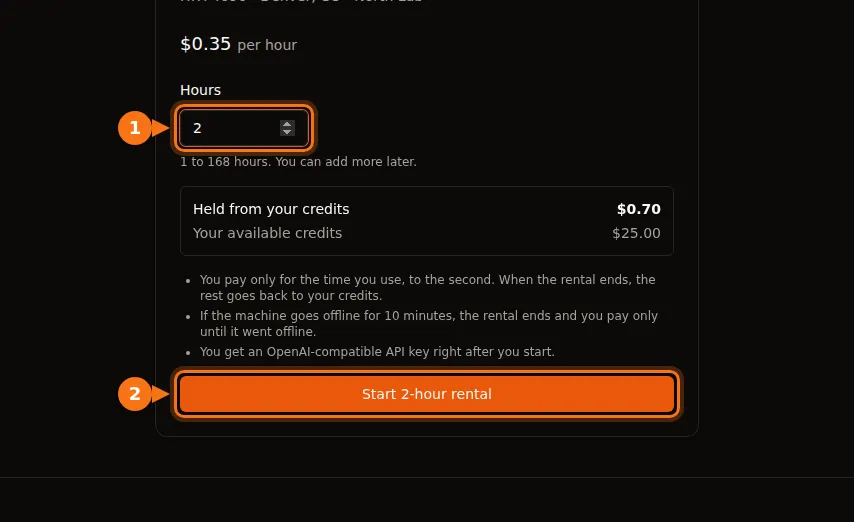
The rent form shows the hold before you start: 2 hours at $0.35 holds $0.70.
A worked example
Book 3 hours at $0.40. The hold is 40¢ × 3 = 120¢ ($1.20). You click End now after 38 minutes 20 seconds, which is 2,300 seconds.
- Charge: ceil(2,300 × 40 / 3,600) = ceil(25.56) = 26¢.
- Returned to your credits: 120 − 26 = 94¢.
- The platform fee is 12% of the charge, rounded to the nearest cent for each rental: round(26 × 0.12) = round(3.12) = 3¢. The provider gets 26 − 3 = 23¢, which is 88.5% of this charge rather than exactly 88%. On larger charges the rounding matters less.
When a rental ends without you
If the booked hours run out, a background job that runs every minute settles the rental. The charge is computed up to the booked end time, so you don’t pay for any delay before the job runs. The API key stops working at the end time. If you want more time, Add hours holds more credits and keeps the same key.
If the provider’s machine goes quiet, the rental ends too. The agent on the provider’s machine sends a heartbeat every 15 seconds. After 10 minutes without one, the rental is ended and billed only up to the last heartbeat. At $0.40 an hour, a machine that drops out 25 minutes into a 3-hour booking costs ceil(1,500 × 40 / 3,600) = 17¢, and the other 103¢ of the 120¢ hold comes back.
There is a catch with whole-hour booking and the 61-minute job. If you book 1 hour and forget to click Add hours before it runs out, the key stops at 60 minutes and you pay 40¢ for an unfinished job. Book 2 hours (80¢ held) and end at 61 minutes, and you pay 41¢ and get 39¢ back. When in doubt, book long and end early; unused time costs nothing.
Picking a billing model by job shape
- Lots of jobs under 10 minutes: per-second or per-minute billing, and check the minimum. Anything that rounds to the hour is the wrong tool here.
- Jobs of 30 to 90 minutes: avoid full-hour rounding (a 61-minute job pays for two hours). Per-second versus per-minute is worth under a cent a job.
- Long runs of many hours: the increment barely registers. Look at idle time, setup and storage instead.
- Bursty calls to one model through the day: a fresh machine per burst pays setup every time, and one machine kept up pays for the gaps. An inference rental that holds a model ready is one way to avoid the setup part, but the clock still runs between calls, so match the booking to when you actually work.
If you want to try it, the GPUFlow marketplace lists hourly prices per GPU, and what you need to rent a GPU covers the account and payment side.
Sources
- AWS, Amazon EC2 On-Demand pricing (billing details): aws.amazon.com/ec2/pricing/on-demand
- Google Cloud, VM instance pricing (billing model): cloud.google.com/compute/vm-instance-pricing
- Microsoft Azure, Linux Virtual Machines pricing (FAQ): azure.microsoft.com/pricing/details/virtual-machines/linux
- Lambda, Billing overview: docs.lambda.ai/public-cloud/billing
- RunPod, Pod pricing: docs.runpod.io/pods/pricing
- Vast.ai, Billing reference: docs.vast.ai/documentation/reference/billing
- GPUFlow docs, Credits, billing and refunds: docs.gpuflow.app/renters/billing
All checked in September 2026.