Many AI tools let you swap OpenAI for another provider, as long as it speaks the same API. You always need the same three things:
| What | Example |
|---|---|
| Base URL (also called API base, endpoint or host) | https://gpuflow.app/v1 |
| API key | gfk_... |
| Model name | qwen2.5:7b |
We use a GPUFlow rental as the example throughout, but the steps are the same for any OpenAI-compatible server: a local Ollama or llama.cpp, vLLM, OpenRouter and many more. Just change the three values.
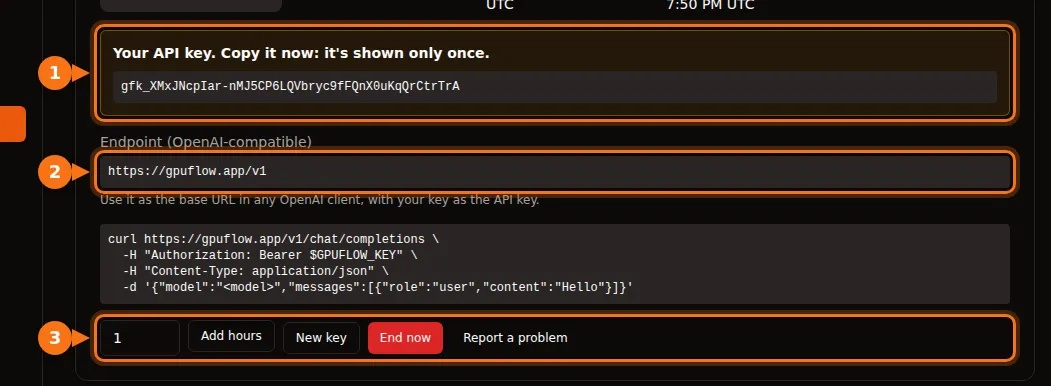
On GPUFlow you find all three on Dashboard → Current Rentals after you rent a GPU:
Before you start: check the endpoint and the model name
One command tells you that the key works and what the model is called:
curl https://gpuflow.app/v1/models \
  -H "Authorization: Bearer gfk_your_key"
The answer lists the models. Copy the id, for example qwen2.5:7b, exactly as written. A wrong model name is the most common reason an app refuses to work.
Know what your endpoint supports. GPUFlow’s endpoint offers /v1/models and /v1/chat/completions, with streaming. It doesn’t offer embeddings, the newer Responses API, or image generation. Some app features need those, and we point them out below.
Chat apps
Open WebUI
- Open Settings → Admin → Connections.
- Under Manage OpenAI API Connections, click + (Add Connection).
- Fill in:
- URL:
https://gpuflow.app/v1 - API Key: your key
- URL:
- Click Verify Connection to test it (saving alone doesn’t test), then Save.
Open WebUI reads the model list from /models on its own. If you run it with Docker, you can set OPENAI_API_BASE_URL and OPENAI_API_KEY instead, but they’re only read the first time Open WebUI starts. After that, change them in the admin screen.
Document upload and search in Open WebUI use a small embedding model that runs locally by default, so they keep working. Don’t switch the embedding engine to OpenAI with your chat endpoint as its URL.
LibreChat
Add a custom endpoint to librechat.yaml:
endpoints:
  custom:
    - name: "GPUFlow"
      apiKey: "${GPUFLOW_API_KEY}"
      baseURL: "https://gpuflow.app/v1"
      models:
        default: ["qwen2.5:7b"]
        fetch: true
      titleConvo: true
      titleModel: "qwen2.5:7b"
      modelDisplayLabel: "GPUFlow"
Put your key in .env as GPUFLOW_API_KEY=gfk_.... Use apiKey: "user_provided" if each user should enter their own key. With fetch: true, LibreChat reads the model list from the endpoint.
LibreChat’s document search (the RAG API) uses OpenAI embeddings by default. Keep it on OpenAI, Ollama or Hugging Face; don’t point RAG_OPENAI_BASEURL at a chat-only endpoint.
AnythingLLM
- Open the LLM settings and choose Generic OpenAI.
- Fill in Base URL (
https://gpuflow.app/v1), API Key, Chat Model Name (qwen2.5:7b), Token context window and Max Tokens.
With Docker, the same settings are environment variables:
LLM_PROVIDER='generic-openai'
GENERIC_OPEN_AI_BASE_PATH='https://gpuflow.app/v1'
GENERIC_OPEN_AI_MODEL_PREF='qwen2.5:7b'
GENERIC_OPEN_AI_MODEL_TOKEN_LIMIT=32768
GENERIC_OPEN_AI_API_KEY=gfk_your_key
Leave the embedder on AnythingLLM Default.
Jan
- Open Settings → Model Providers and click Add Provider.
- Choose OpenAI-compatible.
- Enter a name, the Base URL with
/v1at the end, and your API key. Click Create.
Jan loads the model list when you save. If it doesn’t, add the model name by hand with the + button in the provider’s model list.
Coding assistants
Continue (VS Code and JetBrains)
Add a model to your config.yaml:
models:
  - name: GPUFlow Qwen 2.5 7B
    provider: openai
    model: qwen2.5:7b
    apiBase: https://gpuflow.app/v1
    apiKey: ${{ secrets.GPUFLOW_API_KEY }}
    roles:
      - chat
      - edit
      - apply
Leave out the autocomplete and embed roles: this endpoint only offers chat, and embeddings need /v1/embeddings. In VS Code, Continue has a built-in embedder for codebase search. In JetBrains it doesn’t, so set a separate embeddings model there.
Continue’s Agent mode needs a model that handles tool calls. Only add capabilities: [tool_use] if you know yours does.
Cline
- Open Cline’s settings.
- Set API Provider to OpenAI Compatible.
- Fill in Base URL, API Key and Model (
qwen2.5:7b). - Under Model Configuration, set the context window to match your model.
A note on Roo Code: its docs say it only works with models that support native tool calling, with no fallback. A plain chat endpoint may not work with it.
Code
OpenAI’s Python and Node libraries
Python (pip install openai):
from openai import OpenAI

client = OpenAI(base_url="https://gpuflow.app/v1", api_key="gfk_your_key")

reply = client.chat.completions.create(
    model="qwen2.5:7b",
    messages=[{"role": "user", "content": "Say hello in five languages."}],
)
print(reply.choices[0].message.content)
Node (npm install openai):
import OpenAI from "openai";

const client = new OpenAI({ baseURL: "https://gpuflow.app/v1", apiKey: "gfk_your_key" });

const reply = await client.chat.completions.create({
  model: "qwen2.5:7b",
  messages: [{ role: "user", content: "Say hello in five languages." }],
});
console.log(reply.choices[0].message.content);
Both libraries also read OPENAI_BASE_URL and OPENAI_API_KEY from the environment. Note that their READMEs now open with client.responses.create(...). That’s the Responses API; use client.chat.completions.create(...) as above.
LangChain
Python (pip install -U langchain-openai):
from langchain_openai import ChatOpenAI

llm = ChatOpenAI(
    model="qwen2.5:7b",
    base_url="https://gpuflow.app/v1",
    api_key="gfk_your_key",
    use_responses_api=False,
)
print(llm.invoke("Name three uses for a GPU.").content)
JavaScript (npm install @langchain/openai @langchain/core). Set your key in the environment first, export OPENAI_API_KEY=gfk_your_key, then:
import { ChatOpenAI } from "@langchain/openai";

const llm = new ChatOpenAI({
  model: "qwen2.5:7b",
  configuration: { baseURL: "https://gpuflow.app/v1" },
});
LangChain switches to the Responses API when you use certain features, such as built-in tools or reasoning output. use_responses_api=False keeps it on Chat Completions.
LlamaIndex
Use OpenAILike (pip install llama-index-llms-openai-like):
from llama_index.llms.openai_like import OpenAILike

llm = OpenAILike(
    model="qwen2.5:7b",
    api_base="https://gpuflow.app/v1",
    api_key="gfk_your_key",
    context_window=32768,
    is_chat_model=True,
    is_function_calling_model=False,
)
Set is_chat_model=True. It defaults to False, which sends requests to /v1/completions instead of /v1/chat/completions. For indexing documents, set Settings.embed_model to a real embedding model; LlamaIndex uses OpenAI embeddings by default.
Tools that won’t work with a chat-only endpoint
- Codex CLI. It dropped Chat Completions support in early 2026 and only accepts the Responses API now.
- OpenAI Agents SDK. It uses the Responses API by default. Call
set_default_openai_api("chat_completions"), or wrap your client inOpenAIChatCompletionsModel, and turn off tracing withset_tracing_disabled(True), since tracing needs an OpenAI key. - Anything that needs embeddings from the same endpoint: document search, “chat with your files”, semantic code search. Use the app’s built-in embedder or a separate embeddings provider.
If it still doesn’t work
| What you see | Usual cause |
|---|---|
404 or “not found” | The base URL is missing /v1, or the app adds /v1 itself and you added it twice. |
401 or invalid_api_key | Wrong key, or the rental has ended. On GPUFlow, click New key on Current Rentals if you lost it. |
| ”Model not found” | The model name doesn’t match /v1/models exactly. |
Requests to /v1/completions or /v1/responses fail | The app is using a different API. Look for a “chat model” or “chat completions” setting. |
Related articles
- Hourly GPU or per-token API? What running a 7B–8B model really costs
- GPUFlow vs Vast.ai vs RunPod vs SaladCloud: which one fits your job
Sources
All checked in September 2026.
- Open WebUI: OpenAI-compatible providers, environment variables
- LibreChat: custom endpoints, RAG API
- AnythingLLM: Generic OpenAI
- Jan: custom endpoints
- Continue: OpenAI provider, config reference
- Cline: OpenAI Compatible; Roo Code: OpenAI Compatible
- OpenAI libraries: openai-python, openai-node
- LangChain: Python, JavaScript
- LlamaIndex: OpenAILike
- OpenAI Agents SDK: models
- Codex and Chat Completions: github.com/openai/codex/discussions/7782
- GPUFlow API: Use your API key